Mozilla Firefox, Programming, Software

7 ways to be a better developer

Over the past few months, I’ve been thinking about ways to become a better software developer, specifically in terms of Firefox extension development. I’m listing the ways that I came up with here; most of it can be generalized to the development of any end-user facing program or application, but I wrote it with extension development in mind. (I initially was going to call it “How to be a better programmer”, but as it turned out, the most important things I came up with had little or nothing to do with writing code.)

  1. Keep your ear to the ground.

    Nothing is worse than finding out weeks (or months) after the fact that there’s a bug in your software that you never knew about. Nobody e-mailed you about it, you never came across it, so what were you to do? If you had signed up for Google alerts on your name/your extension/your website’s name, you might have heard about it from someone who blogged about it (“FeatureFox is terrible. It doesn’t even detect my COBOL widgets.”), but didn’t know how to report it as a bug.

    Having Google e-mail you when your name or extension or website is mentioned in a blog post can be invaluable in getting feedback that you otherwise might not have read. (I also find it helpful to use TweetScan to sign up for an RSS feed of tweets that mention your extension. Twittering is the new blogging for many users, especially if it’s just a quick gripe about a buggy extension.)

  2. Give your users a place to talk to each other.

    If you have a popular extension, that can mean that 100,000 users or more have it installed – one person doing customer support for 100,000 users will get old fast. I’ve found that if the users have a place to talk to each other (a comment thread on the extension’s home page, a support forum), oftentimes, the more savvy users will be able to take over a portion of this support duty by helping out a new user who may be in the dark about how to use a certain feature of your extension. Additionally, several users working together may be able to uncover the roots of a bug more easily than just you and a single user working on it. (“We’re all running Linux on a Mac with both Firefox and Seamonkey installed and we’re all using a non-standard profile directory? That’s a weird coincidence…”)

  3. Start a public bug tracking system.

    If you’re not using some kind of bug tracking system (and I don’t include your e-mail inbox as a “system”), you’re not really invested in the success of your extension. Although many extensions are quick one-offs to add a new feature to Firefox, keeping track of issues reported by users is key, as 99% of software grows larger than originally anticipated. A public tracking system adds accountability, it gives other users a chance to chime in on a bug that they’ve experienced but didn’t actually report, and it frees up your inbox without casting valid bug reports by the wayside. (I recommend Google Code; it’s easy to use, has a nice issue tracker, and the support so far has been great.)

  4. Release early, release often

    The old saying “release early, release often” certainly applies here, but I’d like to warn against releasing too early. Uploading an extension to Mozilla Add-ons that only adds a non-functioning item to the Tools menu just to get it out there will do more harm than good, since users will intall it, see that it’s worthless, and uninstall it. Not only will they uninstall it, but they’ll be more hesitant to download it in the future.

    Make sure your first release is functional, even if its function is small. It’s key to get users to download it, but it’s just as key to get them to keep it installed. From that point on though, release as often as you can, since everybody loves a good upgrade.

  5. Talk to your users

    Whether it’s by blogging, Twittering, or creating a thread in a support forum, start a conversation with your users. To many Firefox users, software development is magic – the idea that a person can type up some computer code and make their browser do great new things is mysterious and wonderful, and being able to interact with that person allows them to participate in the magic. The most enthusiastic users (and sometimes the ones with the best ideas) are often those who would have no idea of how to actually write the software behind the features. (Perhaps the fact that they are unencumbered by the burden of implementation is the cause for their enthusiasm…)

  6. Be responsive

    This fits in with the previous point, but it’s more specific. Once a user has posited a question in a support forum or a blog comment, the clock starts ticking. If it takes you a week to respond about why X or Y doesn’t work in your latest release, you can bet that by the time you do answer, that user (and a dozen others who wondered the same thing) have spent the 30 seconds it takes to uninstall your extension because you didn’t take the 60 seconds to respond to them.

    On the other hand, timely responses give your users more faith in your commitment to the project. For example, check out this comment left on my blog after I quickly replied to a user about a problem with TubeStop.

  7. Participate in the development community

    Mozilla has a great community of developers, and you’re doing yourself a disservice if you’re not participating. The Mozilla IRC channels and the mozdev.org mailing lists, for example, are both great resources for connecting with fellow developers to brainstorm over weird bugs or just talk about software-related topics. I like to keep this rule in mind: there’s always someone out there who knows more than you about extension development, and more likely than not, they’re on irc.mozilla.org.

What do you think? What would you add? Anything you disagree with? Reply in the comments, and I will, of course, respond.

Standard
Browser Add-ons, Mahalo Follow

Hey, you got your VC in my XUL!

Fred Wilson is blogging about Firefox extensions today, specifically on the benefits of adding features to the content (the actual webpages) versus adding functionality to the chrome (new toolbars, sidebars, etc.).

He uses Mahalo Follow as an example to make the case for in-content data being more valuable than in-chrome, making me feel all warm and fuzzy inside. Of course, that feeling might also be due to the microwaved kiwifruit I just ate.

Standard
Mozilla Firefox, Programming

Firefox development productivity tip

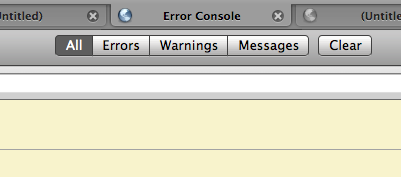
Since I always use Firefox as a single window with many tabs (and have become quite adept at switching quickly between tabs, but not so fast at switching between windows), having the Error Console open in a separate window always slows me down. What I’ve done is created a bookmark on my toolbar (right-click, select “New Bookmark”) that points to chrome://global/content/console.xul. This way, I can control where it opens.

Firefox's Error Console in a tab

Standard
Feed Sidebar, RSS

Feed Sidebar 2.0pre

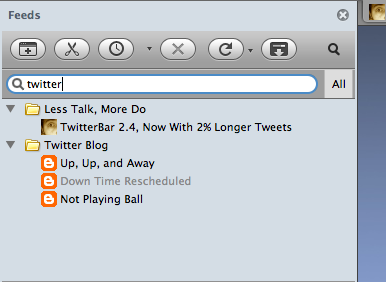
If anyone who has been using Feed Sidebar is interested in testing out the next version, you can install this nightly build of Feed Sidebar 2.0pre. Besides massive improvements in performance and compatibility for various feed types, it sports a nifty new search bar that you can use to filter your feeds:

Screenshot of Feed Sidebar

Filter your feeds with the search bar.

(Clicking the magnifying glass hides the search bar.)

Please send any bug reports to chris@efinke.com or leave them as comments on this post.

Standard
Facebook, Facebook Image-to-Email, Facebook Scavenger

Takedown’d

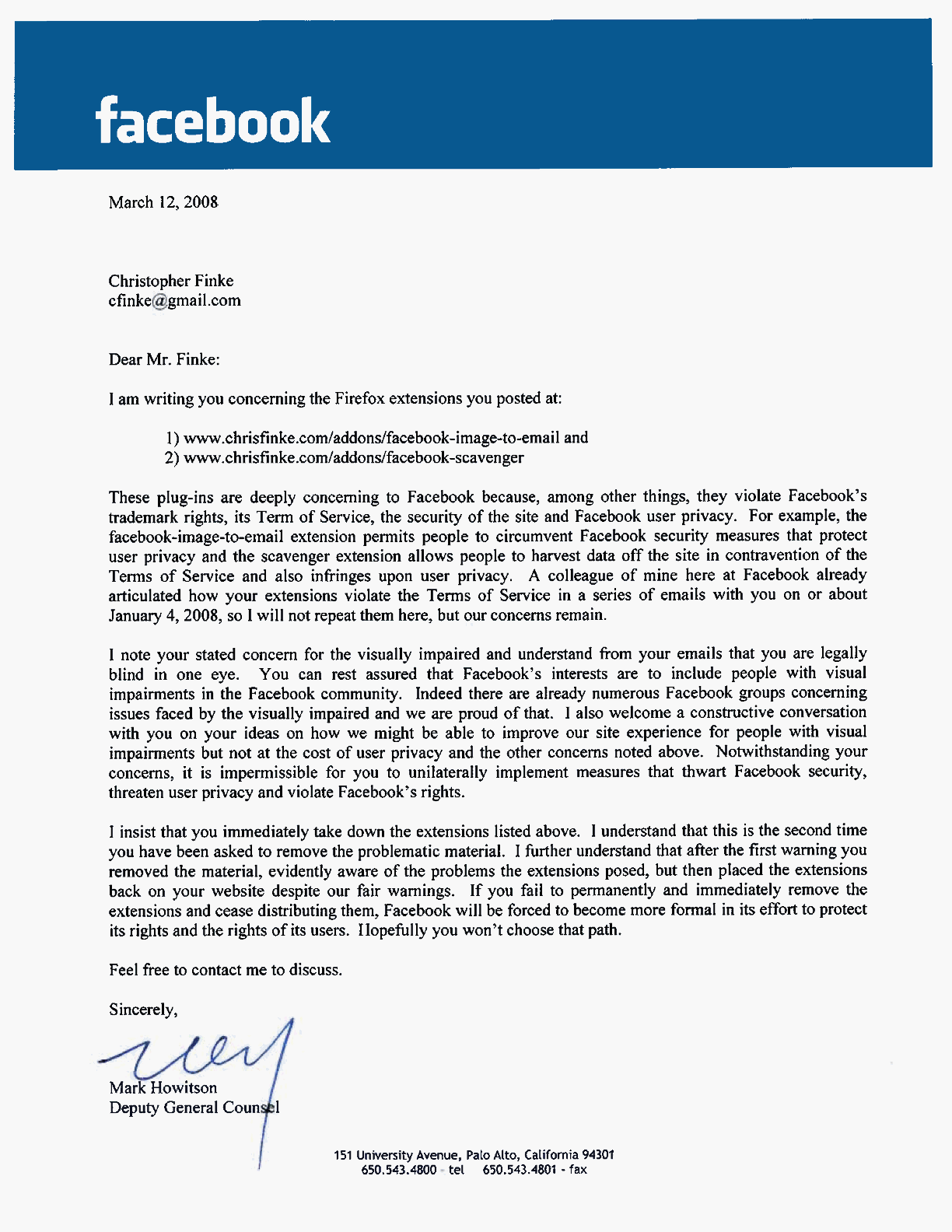
I received this lovely letter from Facebook’s lawyers earlier today. The key points are transcribed below:

“Dear Mr. Finke:

I am writing you concerning the Firefox extensions you posted at:

  1. www.chrisfinke.com/addons/facebook-image-to-email and
  2. www.chrisfinke.com/addons/facebook-scavenger

These plug-ins are deeply concerning to Facebook because, among other things, they violate Facebook’s trademark rights, its Terms of Service, the security of the site and Facebook user privacy. For example, the facebook-image-to-email extensions permits people to circumvent Facebook security measures that protect user privacy and the scavenger extension allows people to harvest data off the site in contravention of the Terms of Service and also infringes upon user privacy. […]

I insist that you immediately take down the extensions listed above. […]

Sincerely,

Mark Howitson
Deputy General Counsel”

Standard
Mozilla Add-ons, TubeStop

TubeStop reviews requested

TubeStop was discontinued on December 25, 2012, and Firefox’s newly-introduced controls for managing auto-playing videos have since made it obsolete.

I’ve finally uploaded TubeStop to Mozilla Add-ons, but it can’t be brought out of the sandbox (protected area for untrusted extensions) until it has some reviews and undergoes an editor approval process. If you use TubeStop and find it useful, I’d appreciate it if you’d write a quick review of it over at the Mozilla Addons page for TubeStop so that I can get that process started.

Standard
Digg

Giving up on Digg

I won’t be reading Digg any more. I’ve visited it almost daily for the past 2 years or so, but it’s been a long time since I’ve seen something on Digg that I haven’t already seen at another site (except for stories about Digg itself). The front-page news is always at least a day old, and there are far too few real news stories and way too many “LOL FUNNY PIC” and “OBAMA CAN HAZ ELEKSHUN” stories.

Oh, and where is that OpenID support that was promised to be added “sometime this year” in early 2007? Here is what I wrote in an e-mail to Tom Drapeau after hearing that:

I’m not normally a betting man, but I’d put a week’s pay against Digg actually rolling that out before December 31, 2007. Their ratio of features promised to features delivered is, how you say, crappy.

I’d say that I won that bet quite handily.

Standard
Browser Add-ons, Feed Sidebar

Feed Sidebar updated with everything you wanted

I’ve just released an update to the Feed Sidebar Firefox extension that adds essentially every major feature request that I’ve gotten since version 1.2 came out:

  • Biggest improvement: Feed Sidebar now has its own history for tracking which items are read, rather than using the browser history. This means that you can clear your browsing history without clearing your feed reading history.
  • Feed Sidebar now uses Firefox’s native feed parser. This slims down the code in the extension and (probably) the number of bugs.
  • The sidebar now remembers which feeds you collapse, and the next time those feeds load, they’ll still be collapsed. This has been requested ever since the first version came out, so I feel good about getting it done.
  • You can unsubscribe from a feed directly from the sidebar by right-clicking on it and choosing “Unsubscribe.”
  • You can choose to display all items from all feeds, not just new items. If you enable this (in the Feed Sidebar preferences dialog), items you’ve read will be light gray; new items will appear as they always have.
  • I moved the update status (“Next update: 11:00 PM”, “Checking 123 of 456 feeds…”) to a status bar inside the sidebar. This clears up room in the toolbar for more buttons, if necessary.
  • The first time you run Firefox after installing the extension, the sidebar will open automatically, and the Feeds button will be added to the toolbar. (I had gotten lots of comments along the lines of “I installed it; now what do I do?” Hopefully, this will mitigate that problem.)

Overall, I thinks this version is much sleeker and much more usable than the last, which is pretty much all that matters. You can download the latest version of Feed Sidebar from Mozilla Add-ons.

Standard