Sort your feeds in Feed Sidebar
A lot of people have asked for the ability to sort the feeds that appear in the Feed Sidebar extension for Firefox, so I've taken some time to integrate some basic sorting options. I would like to get some feedback on this feature before releasing it to the general Feed Sidebar audience, so I've uploaded a version for testing here. (You may have to save it to your computer and open it with Firefox in order to install it.)
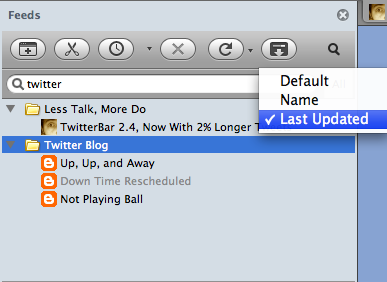
The sorts I've implemented are:
- Default: Sorts the feeds in the order that you added them to your bookmarks. This is how your feeds have been sorted up to this point.
- Name: Sorts the feeds alphabetically by feed title. (This doesn't yet ignore things like "a", "an", "the", but it will before the final release.)
- Last Updated: Sorts the feeds with the last updated feed at the top.
Please leave any feedback you have either as a comment on this post or by emailing me at cfinke@gmail.com.

Christopher Finke is a software engineer. He is available for birthday parties and bar mitzvahs. 

February 7th, 2009 at 5:54 pm
"A ", "An ", "The " - thanks for working on that. [I'll spare you my alphabetization rant.]
Comment - maybe with an edit at the bottom.
_______________________________________
Suggestion
Have you looked at GMarks? You might get some ideas from how it's laid out.
GMarks
https://addons.mozilla.org/en-US/firefox/addon/2888
It's in perpetual beta - the newest versions are here:
Discussions - GMarks | Google Groups
http://groups.google.com/group/GMarks/topics?start=
GMarks 0.9.10b5
_______________________________________
Unread problem
I marked a few things as read and then as unread yet within less than an hour - they had disappeared entirely. Even show read doesn't show them.
Edit
I'm not sure how often it happens - but *unread* items (that I've never touched) - are in fact disappearing from live bookmark to my yahoo pipes feed.
_______________________________________
bottom window of the sidebar
I tend to middle click links and just after I do that - the bottom window opens up for the next bookmark which is a bit distracting.
And a left click forces opens the bottom window.
I know too many options is bad - but maybe bottom window prefs would be a good thing. Or maybe something like Ctrl-click could control the window.
Edit 1
Hmm... - maybe all you need to do is give people a heads up that they can hide the window by dragging the top of it down.
Edit 2
#1 has a problem - left clicking requires multiple clicks to get the tab open.
_______________________________________
single keystroke combos
= to mark as read
How about a single keystroke combo to mark as read without opening the bookmark in a tab. I know I can do it via right click and clicking again - but I'm lazy and impatient. And who isn't - on the net?
= to mark as read
To hide and unhide. I hide and unhide a lot since there are no filters.
_______________________________________
filtering list that marks as read
I hope it's coming...
_______________________________________
Notes - like regular bookmarks have
This may be impossible - but how about adding a Note field like regular bookmarks have?
_______________________________________
About your site
The "comment moderation" doesn't seem to work on long-ish comments.
February 7th, 2009 at 5:56 pm
>> About your site
>>
>> The "comment moderation" doesn't seem to work on long-ish comments.
Hmm... am I wrong? That last comment can be seen as being in moderation.
February 7th, 2009 at 10:20 pm
______________________________
(empty) problem
movies - torrentz.com
http://pipes.yahoo.com/pipes/pipe.run?_id=64083a307cc62bbf8d13b7246507dfe5&_render=rss
I stuck a single feed (movies at torrentz.com) into the pipe - it's a "slow" pipe - only about 10-30 items a week.
Suddenly it showed (empty) in my Firefox bookmarks and in Feed Sidebar the folder doesn't appear.
My feed/pipe for thepiratebay.com also shows (empty).
movies - thepiratebay.com
http://pipes.yahoo.com/pipes/pipe.run?_id=de955d65592326b8d73f0e78a12653fa&_render=rss
Both of them are not empty. If you click on the rss links - you can see items in both feeds.
Is it a live bookmarks bug?
Both of them are sorted A-Z before being outputted. Could my A-Z sorting be causing the problems?
______________________________
How about numbers?
How about numbers on the right side of the bookmark title that show how many unread items there are?
important feeds (367)
not so important (45)
misc (108)
______________________________
mark as read - for multiple items
Is it possible to set things up so multiple items can be marked as read?
February 9th, 2009 at 3:18 am
hello.
I use firefox with a screen reader. how do I access this tool bar with the keyboard? any additional keyboard shorcuts are implimented?
thank you.
March 14th, 2009 at 6:32 pm
[...] published an update to the beta of Feed Sidebar that I talked about here: Sort Your Feeds in Feed Sidebar. In this version (3.2pre2), I’ve made the following [...]