Update: TwitterBar was sold to HootSuite and renamed HootBar in March of 2011. TwitterBar for Chrome was discontinued in October of 2012.
Version 2.9 of TwitterBar for Firefox was made available on Mozilla Add-ons today, and it has a very cool new feature: you can now use TwitterBar with more than one Twitter account.
To post to a specific account, just type your message like this:
I am posting to my other account. –@other_account –post

If you haven’t yet authorized TwitterBar for @other_account, you’ll be walked through the authorization process.
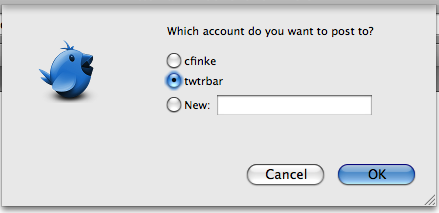
If you’ve authorized more than one account, and you don’t specify which account you want to post to, you’ll be given a list of choices:
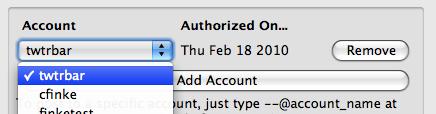
You can manage your accounts from the TwitterBar options (just type “–options”).
Finally, to authorize a new account without posting to it, just type “–account” in the URL bar.
To install this new version of TwitterBar, download it from Mozilla Add-ons.
The next obvious step is the ability to post to multiple accounts simultaneously, and the next version of TwitterBar will offer than feature. If you’d like to beta-test that update, e-mail me and let me know.


Leave a Reply