Feed Statistics Plugin for WordPress

Note: Feed Statistics has been discontinued and is no longer supported.

Feed Statistics is a plugin for WordPress blogs that tracks statistics for your RSS/Atom feeds, including the number of subscribers, which feed readers they’re using, which posts they’re viewing and which links they’re clicking on.

To install, unzip feed-statistics.php from the zip file below and upload it to the wp-content/plugins/ directory of your blog, and activate the plugin from your Administration panel. Then, you have two ways to display your subscriber count. You can either add the following code to your theme (in your sidebar, for example):

	<?php feed_subscribers(); ?>

This will display a simple “123 feed subscribers” line of text that you can markup however you want. If your theme is widget-compatible, you can instead use the Feed Statistics widget, which will display the same text, but inside of an easy-to-manage widget. (If you want to style the widget text, it is inside a <span class="subscriber_count"> tag.)

The plugin also adds a “Feed” section to your WordPress administration panel. This section has four subsections: Feed (Options), Feed Readers, Post Views, and Clickthroughs.

Options

Settings for which readers to count as subscribers and toggles for turning view and click tracking on and off.

Top Feeds

Displays a list of the feeds most often requested by your subscribers. Note: a subscriber that follows multiple feeds will only be counted once in the total subscriber count, but all of the feeds that they subscribe to will appear on this page.

Most popular feeds

Feed Readers

Displays which feed readers your subscribers are using.
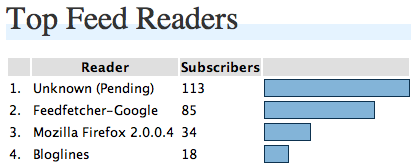
Feed Reader Chart

Post Views

If you have post view tracking turned on (it’s enabled by default), this page will show the posts in your RSS feed that are most popular.
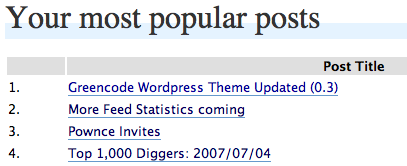
Chart of your most popular posts

Clickthroughs

If you have clickthrough tracking turned on (it’s disabled by default), this page will show the links in your posts that your feed subscribers are clicking on.

Track clickthroughs on links in your feed

It will take a few days for the subscriber count to become accurate, so you may want to wait a day or two between installing/activating the plugin and publicly displaying your subscriber count.

Note: watch the Feed Statistics section of my blog for information on updates to this plugin.

Comments

193 responses to “Feed Statistics Plugin for WordPress”

  1. Adam Dempsey Avatar

    Going to try it out now, sounds great :)

    Look forward to the updates too.

  2. Conny Avatar

    Don’t work at my blog. :(

  3. Conny Avatar

    I had put it into my theme faces. But do not work. I have wp 2.0.9 Is that the mistake?

  4. Veg Avatar
    Veg

    Sounds like a nice idea but version 1.0.1 wouldn’t activate in the plugin menu – died due to a fatal error.

  5. george donnelly Avatar

    “Plugin could not be activated because it triggered a fatal error.”

    This on WP 2.2, PHP 5.2.3.

  6. huda Avatar

    sounds great, say goodbye to feedburner eh??
    I’ll try this, thx…

  7. Vidas M. Avatar

    Does this plugin properly deals with Google reader? Google reader groups all reads into one and reports in the link how many subscribers are. Will this work?

  8. Christopher Finke Avatar

    Vidas: Yes, this will correctly count subscribers reported in the user-agent string by third-party feed readers such as Google Reader, Netvibes, etc.

  9. Vidas M. Avatar

    Installed, tested, perfect. Thank you very much Christopher! I was looking for this for such long time. I did not wanted to redirect my subscription to feedburner, so now I have full control of my blog and I know how many people are reading it.

    Thank you very much again!!!!!

  10. jaggs Avatar
    jaggs

    Hmm..got an error –

    WordPress database error: [Access denied for user… blah…
    CREATE TABLE IF NOT EXISTS wp_feed_subscribers ( subscribers INT(11) NOT NULL DEFAULT 0, identifier VARCHAR(255) NOT NULL DEFAULT ”, date datetime NOT NULL DEFAULT ‘0000-00-00 00:00:00’, PRIMARY KEY (identifier) )

  11. Christopher Finke Avatar

    jaggs: That looks like your database user does not have “CREATE TABLE” permissions. You’ll have to get that table created manually by a user that does have those permissions.

  12. Jaggs Avatar
    Jaggs

    Thanks Christopher.

  13. gemme Avatar

    Thanks for this brilliant script. I was never too much thrilled of giving the control of my feed away and this is the plugin I was waiting for. Thanks a lot.

    I’m looking forward to new features:) Maybe the features FeedBurner Stats PRO is offering…

  14. Daniel Avatar
    Daniel

    have installed version 1.1.1 and now appears a new FEED top menu. But when I click on it a “not found page” appears.

    Thanks!

  15. Christopher Finke Avatar

    Daniel, which version of WordPress are you running? When you get the error, what is the URL in the address bar?

  16. Jaggs Avatar
    Jaggs

    Christopher, this is a superb plugin (great upgrade too). I’m intrigued as to why the clickthrough feature is not default enabled while the post views is? Is there some performance penalty? And does it play nice with excerpted feeds which have images delivered to the readers?

  17. Christopher Finke Avatar

    Jaggs: There are 2 reasons for not enabling the clickthrough feature by default.

    #1 is that it’s more invasive than the post view tracking is, in that it actually modified the content of the post by changing the links. This means that readers won’t be able to tell exactly where the links lead, and that might be a problem for some.

    #2 is that when clickthrough tracking is turned on, if your site goes down for whatever reason, all of the links in your feed are now dead as well, even if the feed is already cached.

    There is a small performance hit in that every outgoing link in your feed is routed through your own site first.

    I know of no incompatibilities with excerpted feeds.

  18. dP Avatar

    I wonder if there is a way to manually add some feed that comes in a bit differently? LiveJournal has the capability of subscribing to a feed and then making that feed available to its members for a feed on the Friends Page.

    Right now, my Feed Widget says I only have one subscriber from LiveJournal, which is the webmaster. But when I look at my logs, the feed from them reads like this:

    “LiveJournal.com (webmaster@livejournal.com; for http://www.livejournal.com/users/revisionnotes/; 11 readers.”

    In other words, they have set up my blog as a mirror blog on their site (so to speak), which is accessed only by the webmaster and then directed to the eleven readers. But it still tells how many readers there are from LiveJournal.

    So–anyway to automatically add those into the feed count? Or do I have to always look at my log for the number of feeds from LiveJournal? The ins and outs of feed counts!

    Thanks!
    dP

  19. jaggs Avatar
    jaggs

    Thanks Christopher, that’s cool. The Post View tracking is not working for me, but I think that’s a result of my strange feed structure. However I do also note that there are a *lot* less Google Reader stats coming in for my feeds than Feedburner showed when I was running that for a while. I’m wondering whether you’re picking them all up…?

  20. Daniel Avatar
    Daniel

    In my website is not working property, when I go to the admin and click in FEED top menu, the page do not exist :-(

  21. XIII Avatar

    Can’t wait to get home and try this, this would negate the main reason I’ve been looking at FeedBurner.

  22. Markus Avatar

    Daniel:
    Had the same problem on a wordpress blog, too. I did the mistake to place the file feed-statistics.php in a subfolder under plugins/ .
    After moving feed-statistics.php to /wp-content/plugins/feed-statistics.php everything works fine.
    HTH

    Thank for the plugins, it’s a very nice thing for stat-addicts who don’t want to be burned by feedburner or similar services ;)

    cheers
    markus

  23. Gemme Avatar
    Gemme

    Very nice update of the plugin, it gets better and better.

    I have a question about the the clickthrough feature

    You mention:

    #1 is that it’s more invasive than the post view tracking is, in that it actually modified the content of the post by changing the links. This means that readers won’t be able to tell exactly where the links lead, and that might be a problem for some.

    This only applies (and forgive my ignorance here) to the links in the feed I guess and not to any links of the website, right?

    Thanks again.
    Thanks

  24. Christopher Finke Avatar

    Gemme: That is correct.

  25. dP Avatar

    A question about the stats. You allow the user to set how many days the program will look at. When I set it to 2 days v. 60 days, the answer if very different. I realize that it is dependent upon how many times your feed is accessed and that’s why the results vary.

    Is there an industry standard for this–you can officially say your Feed has this many subscribers, based on a certain number of days of activity? Or is this too new a count to have a standard? How many days does Feedburner, for example, count?

    Thanks!
    dP

  26. Randy W. Sandberg Avatar

    Hello Chris,

    I’m having an issue with Feed Statistics version 1.1.2. It activates, but when I go to any of the Feed Statistics’ panes, I see the following error message:

    WordPress database error: [Table ‘araa_home.wp_feed_subscribers’ doesn’t exist]
    SELECT SUM(subscribers) total FROM wp_feed_subscribers WHERE (date > ‘2007-08-03 15:39:59’) OR ( LOCATE(‘###’,identifier) != 0 AND date > ‘2007-07-28 15:39:59’ )

    P.S., I’m using PHP 4.3.11 and WordPress 2.2.2.

    Thanks in advance!

    Randy

  27. Christopher Finke Avatar

    Randy – Does your WordPress DB user have CREATE TABLE permissions? If not, you may have to create the tables manually. Let me know, and I can send you the SQL.

  28. Randy W. Sandberg Avatar

    Hey Chris,

    Thanks for the SUPER fast response! As for my reply… I think so. I say this as a complete rookie in regards to working with mySQL. Also, based on the fact that I have successfully installed many other plugins that have been able to create their own tables. How can I know for sure?

    Thanks in advance,

    Randy

  29. Randy W. Sandberg Avatar

    Hey Chris,

    Oh, my WordPress user! Yes, I’m pretty sure I have CREATE TABLE permissions being that I am the administrator. The one strange thing is that a while back I successfully installed your plugin (Feed Statistics v???). Then, for whatever reason, I removed your plugin and dropped the associated mySQL table(s). Could this action of mine have caused the issue. And, if so, how can I fix it?

    Thanks in advance again!

    Randy

  30. Christopher Finke Avatar

    Yes, that would explain it. To avoid doing extra queries, the plugin checks for a stored version number. I think if you delete the row in wp_options where option_name equals feed_statistics_version, and then just visit one of the Feed admin pages, it should recreate the tables.

    Chris

  31. Peter Avatar
    Peter

    I am a WP hosted user. Assume this only works for WP.org users. Is that right?

  32. shanX Avatar

    Hi Chris,

    Great work, Thanks. A plugin, I have been searching for sometime, as an alternative for Feedburner….

    But not working for me :(

    WP private-hosted (on a sub directory of the domain), PHP 5, Unix and plugin installed/activated succesfully. But doesnt show any stats, stats area is blank, although it loads. It’s been 3 days so far, but feed has been requested several times every hour. Has this gotta do something with PHP version??

  33. Azz Avatar
    Azz

    In the next version do you think is possible implement a way to know which feed the subscribers are reading ? For example a user could be subscribed to a subcategory feed

    http://www.mysite.com/category1/feed

    could be interested know which feed a subscriber is reading :)

  34. Andreas Avatar

    I installed the plugin some days ago, but it’s still telling me “0 Feed Subscribers”. That’s odd, because I know at least two people for sure, who are subscribed to my feed (using bloglines.com).

    Only at Feed -> Post Views I get results. The rest is still empty.

    Any idea what went wrong and what I can do?

  35. Andreas Avatar

    Maybe the same problem as shanX (nr. 43)? Hmmm…

  36. Andreas Avatar

    No idea, anybody? :-(

  37. heiste Avatar

    @ Andreas: here its the other way around. I have 47 feed-readers (?) but no popular posts. Did you look in your access.log file. I always have a 404 when somebody is reading a post via rss. it logs like GET /wp-content/plugins/feed-statistics.php?view=1&post_id=318 HTTP/1.1″ 404 315.

    Any help Chris?

  38. Tomislav Avatar

    Hi Chris,
    great plugin but it will be even better when I get it running :)
    Check this:

    WordPress database error: [You have an error in your SQL syntax. Check the manual that corresponds to your MySQL server version for the right syntax to use near ‘ON DUPLICATE KEY UPDATE date=NOW(), user_agent=’Moz]
    INSERT INTO wp_feed_subscribers SET subscribers=1, identifier=’89.164.8.136′, user_agent=’Mozilla/5.0 (Windows; U; Windows NT 5.1; en-US; rv:1.8.1.6) Gecko/20070725 Firefox/2.0.0.6′, date=NOW() ON DUPLICATE KEY UPDATE date=NOW(), user_agent=’Mozilla/5.0 (Windows; U; Windows NT 5.1; en-US; rv:1.8.1.6) Gecko/20070725 Firefox/2.0.0.6’, subscribers=1

  39. Christopher Finke Avatar

    Tomislav: it looks like you’re running an older version of MySQL that doesn’t support the ” ON DUPLICATE ” syntax.

  40. Nathan Pralle Avatar

    Like Andreas, I was getting no hits on my statistics until I modified the code slightly. The problem is that the standard feed URL for WordPress ends up being like this:

    site.com/blog/index.php/feed/rss/

    Under the function, “is_feed_url()”, it checks for the basename of the URL and uses that in a CASE statement to see if it’s a valid feed URL. Well, the basename of the above ends up being “feed”, not one of the choices in the CASE.

    So, by adding the line below, I got mine to work:

    case ‘feed’:

    This was added on line 239 of the current version, so it looks like this:

    case ‘wp-rdf.php’:
    case ‘wp-rss.php’:
    case ‘wp-rss2.php’:
    case ‘wp-atom.php’:
    case ‘feed’:
    return true;
    break;

    That seemed to do the trick. YMMV.

    Nathan

  41. Nathan Pralle Avatar

    CORRECTION: I had to add THREE cases to the switch to make it work — adding ‘feed’ only fixes it for standard RSS — RSS2 needs ‘rss2’ and Atom needs, strangely enough, ‘atom’. So you end up with a switch that looks like this:

    case ‘wp-rdf.php’:
    case ‘wp-rss.php’:
    case ‘wp-rss2.php’:
    case ‘wp-atom.php’:
    case ‘feed’:
    case ‘rss2’:
    case ‘atom’:
    return true;
    break

  42. Andreas Avatar

    Hi Nathan,

    thanks a lot. I tried you codechange, and it seemed to work. But I did get errors if someone wanted to subscribe to my feed (a SQL-error); comments worked.

    Strange.

    I disabled the plugin again.

    Greetings,
    Andreas

  43. heiste Avatar

    Hello Christopher,
    just updated your plugin. On the mainpage I get this SQL error:
    [Can’t group on ‘identifier’]
    SELECT subscribers AS total, CASE WHEN SUM(subscribers) = 1 THEN identifier ELSE CONCAT(identifier, feed) END AS identifier FROM wp_feed_subscribers WHERE ( (date > ‘2007-08-28 22:38:59’) OR ( LOCATE(‘###’,identifier) != 0 AND date > ‘2007-08-08 22:38:59’ ) ) GROUP BY identifier

    it still shows Top Feeds and Feed Readers. Post Views and Clicktroughs still missing as described above at 48. Do have any hints. Thank you very much

  44. Not specified Avatar
    Not specified

    I noticed that google webmaster tools now report rss subscribers information and wanted to ask you this.
    Google reports following “Google Subscribers”:
    http://…/Blog/?feed=atom 3
    http://…/Blog/?feed=rss2 15
    http://…/Blog/feed 4
    http://…/Blog/feed/atom 4
    So total on google seems to be: 3+15+4+4=26.

    Feed statistics reports google feedreader as:
    Feedfetcher-Google 19

    Any idea why there differences?

  45. Christopher Finke Avatar

    Google could be reporting subscribers over a longer period of time than Feed Statistics; that could account for the discrepancy.

  46. MetaActive.com Avatar

    Thank you very much for updating your feed stat plug in.This release was better in someway than the older one.One feature I’d really like was a way to distinguish between search engine bots and users.

    Thanks again.

  47. MetaActive Blogging Avatar

    Thank you very much for updating your feed stat plug in.This release was better in someway than the older one.One feature I’d really like was a way to distinguish between search engine bots and users.

    Thanks again.

  48. Alexander Lazarev Avatar

    hey, nice plugin but not work with last wordpress 2.3 and mysql 5.x
    got error
    wp_feed_subscribers’ doesn’t exist]
    SELECT subscribers, CASE WHEN subscribers = 1 THEN identifier ELSE CONCAT(identifier, feed) END AS ident FROM wp_feed_subscribers WHERE ( (date > ‘2007-10-09 14:48:14’) OR ( LOCATE(‘###’,identifier) != 0 AND
    its after install

  49. Christopher Finke Avatar

    Alexander: Try downloading version 1.3.1 and then calling your RSS feed with “?reset_feed_statistics=1” on the end. This will try and recreate all of the tables that Feed Statistics uses.

  50. Alexander Lazarev Avatar

    Christopher,
    got error again, i think here is problem with sql:

    WordPress database error: [Specified key was too long; max key length is 1000 bytes]
    CREATE TABLE IF NOT EXISTS wp_feed_subscribers ( subscribers INT(11) NOT NULL DEFAULT 0, identifier VARCHAR(200) NOT NULL DEFAULT ”, feed VARCHAR( 200 ) NOT NULL, date datetime NOT NULL DEFAULT ‘0000-00-00 00:00:00’, user_agent VARCHAR(255) NOT NULL DEFAULT ”, PRIMARY KEY (identifier, feed) )

  51. Ray Marotta Avatar

    Help!
    Need the bit of php for wordpress so it will display on my site! – not listed in your notes above…..

  52. George Avatar

    got this error:

    WordPress database error: [Table ‘crazynla_wrdp1.wp_feed_subscribers’ doesn’t exist]
    SELECT subscribers, CASE WHEN subscribers = 1 THEN identifier ELSE CONCAT(identifier, feed) END AS ident FROM wp_feed_subscribers WHERE ( (date > ‘2007-10-13 08:42:13’) OR ( LOCATE(‘###’,identifier) != 0 AND date > ‘2007-10-07 08:42:13’ ) ) ORDER BY ident ASC, date DESC

  53. Aaron Avatar

    Great plugin! I really love it! Now I need not worry about burning all my feeds through FeedBurner!!

  54. djStelios Avatar

    @ Alexander:
    I had the same problem. This error occurs because I’m sure you have UTF8 collation at your database. UTF8 needs 3 bytes for each character instead of 1.

    Try to change the identifier and feed lengths from 200 to 166. I’m not sure if it’s 100% working solution but I had to installation problems with this alter.

  55. Christopher Finke Avatar

    @djStelios, @Alexander: Changing the feed column to have a length of 120 should fix the problem and not cause any trouble.

  56. jaggs Avatar
    jaggs

    Chris, Google Reader stats have now completely disappeared from my installed Feed statistics. Weird? Everything else seems to be fine.

  57. Laundro Avatar

    Awesome plugin! Thanks so much for this!

  58. Roman Nastenko Avatar

    WordPress database error: [Table ‘blogdeluxeru.wp_feed_subscribers’ doesn’t exist]

  59. Anmol Mehta Avatar

    Any thought on DPs question above regarding how many days to set the collection to? Such as what feedburner uses, or what is a typical “standard”? The results vary vastly based on this value.

    Any input is appreciated and thanks for the great plugin.

  60. Anmol Mehta Avatar

    Hi,

    How do I disable this plugin? As soon as I disable the plugin my feed no longer validates? When I re-enable it, it validates again. I am doing some trouble shooting on my feed and need to disable this plugin temporarily.

    Once enabled, does it leave behind debris which is not removed when disabled? Please help.

    my feed URL is http://www.anmolmehta.com/blog/feed

    Thanks,
    Anmol

  61. Anmol Mehta Avatar

    More specifically, once I turn on click tracking for which links my subscribers click and then turn off the option. The feed invalidates w/ following error…

    Sorry

    This feed does not validate.

    *

    line 223, column 1570: Invalid character in a URI: ‘”‘ (17 occurrences) [help]

    … DE”>GRATITUDE]]>

  62. Insomne Avatar

    Im going to try the plugin
    Thanks

  63. Vladimir Avatar

    #45 & #43

    I think the problem is in functions:

    function clickthrough_replace($content)
    function postview_tracker($content)

    lines:

    $redirect_url = get_bloginfo(‘url’) . “/wp-content/plugins/feed-statistics.php?url=”;

    $content .= ‘ ‘;

    Note: get_bloginfo('url') is same as home URI (Blog address). I Think that is OK if you install WordPress in site root. In a case that your install directory is different, you should use get_bloginfo('wpurl') (WordPress installation URI) (WordPress Codex).

    I replaced get_bloginfo(‘url’) with get_bloginfo(‘wpurl’). Time will tell is it ok? Hope it is :))

  64. cross Avatar

    Great!

    A lot of time I tried to fined this plugin, and only now will use on my blog.

  65. Heiko Avatar

    Do you know that your plug-in will working with WordPress 2.5 or not?

  66. Christopher Finke Avatar

    Yes, it works with WordPress 2.5.

  67. BradyDale Avatar

    I’ve added the plug-in and it’s working well. I just wish I knew what the line of code was that would allow me to display my feed stats on my homepage.

    There’s no code after you write “the following line of code” up at the top.

  68. Christopher Finke Avatar

    BradyDale: Sorry about that, I’ve fixed it so you should be able to see the code you need.

  69. BradyDale Avatar

    I have a question… I don’t see an FAQ for this page.
    OK, you have the Feed Statistics set to 3 Days of feeds by default. is there any reason not to raise that to a higher number?

    I guess what I’m asking is… if a person checks your feed multiple times over whatever period you have Feed Statistics tracking, does it count them as more than one person?
    Or does Feed Statistics know that it’s the same person opening up his Bloglines account for the 2nd time?

    Do you want to keep the number smaller for a more modest, accurate count… or does Feed Statistics just know when people are repeat visitors and not report them?

  70. Christopher Finke Avatar

    BradyDale: Feed Statistics doesn’t count the same person checking your feed multiple times as multiple people. I use 7 days as my default, and it seems to be pretty accurate. 3 was arbitrarily chosen as the general default; feel free to change it.

  71. BradyDale Avatar

    Awesome! Thanks for the clarification. I have mine set at 20. Why leave anyone out? I was so worried that I really had 5 people who checked the feed every day. Great news!!!
    Thanks for this!

  72. Giysi Giydirme Avatar

    Very nice plugin. Thanks.
    Keep up the good work.

  73. Jonathan Avatar

    How can I test to make sure this plugin is actually working? I have had it installed for several days and it still says I have zero subs, and I am sure I have at least one or two, since I’m subscribed to my own feed.

  74. Wowbagger.de Avatar

    Works perfectly!

    Thanks a lot!

  75. asaaki Avatar

    i’ve got trouble with the tracking-function. the generated […]/feed-statistics.php?url=[code] links don’t work and i get an error 500.

    i use wordpress 2.6

    do anybody know this problem and has fixed it?

    thank you!

    -aki

  76. Angsuman Chakraborty Avatar

    Just activating it was enough to bring down my blog. The front page was showing blank. All other pages were attempting to download a file instead of displaying it.
    I haven’t investigated in details but that enough to disable the plugin once and for all.

    I am using the latest version of WordPress. Any idea / fix?

  77. N.B. Avatar
    N.B.

    Hello,

    Today I noticed that WordPress plugins reported that there is new version of Feed Statistics plugin: 1.3.2. I used automatic update and it appears to be succesfull. But after that in admin area when I go to “FEED” menu, i am getting 404 error. Any idea why? Also, why there is no info about 1.3.2 release in your blog?

  78. Christopher Finke Avatar

    N.B.: I’m sot seeing that problem; it’s probably related to the way your blog is set up. What is the URL to your wp-admin/ directory? (i.e., is it http://myblog.com/wp-admin/, or is it http://mysite.com/stuff/blog/wp-admin/ ?)

  79. N.B. Avatar
    N.B.

    URL to my wp-admin folder is:

    http://www.MyWebSite.com/MyBlogName/wp-admin/

    When I click on “Feed” link it goes to the page:

    http://www.MyWebSite.com/MyBlogName/wp-admin/feed-statistics.php

    I checked that folder and there is such file feed-statistics.php in wp-admin folder.

  80. Neuro Avatar

    Hello, great plugin, i have only 1 problem,
    when i click the ‘feed’ link at the admin section, it goes to feed-statistics.php page which cannot be found. Anyone fixed this?

    Thanks for the plugin!

  81. Kris Avatar
    Kris

    I have the same problem with wordpress 2.6.2.
    When i click the ‘feed’ link at the admin section, it goes to http://www.MyWebSite.com/MyBlogName/wp-admin/feed-statistics.php page which cannot be found.

    Thanks for the plugin!

  82. D'Arcy Norman Avatar

    I’m noticing the same thing. The plugin-generated link to wp-admin/feed-statistics.php fails, but the direct URL of wp-admin/admin.php?page=feed-statistics.php still works fine (but it’s not used on the Feed link)

  83. a Avatar
    a

    same problem as 96, 95, 94 — am not sure if this is working anymore.

  84. Selil Avatar

    I had the same problem as 96 through 97. The issue was that the feed-statistics.php file was deleted from the plugins director (see the read me file for details). This happened during the auto update process. Reinstalling as if it was never there fixed it and the 404 error is just fine. My guess is something got hinked up (tricky technical term) in the auto update script. feed-statistics.php was nowhere to be found on my webpage. Maybe just me but I’m betting not.

  85. a Avatar
    a

    I’ve tried to uninstall, re-install, deactivate, reactivate – same problem. The feed-statistics.php file is located inside of the plugin directory, but pointing to it there just gives a blank page.

  86. D'Arcy Norman Avatar

    I’ve tried manually installing the files, and they all appear to be in place, but I still get a 404 when going to the Feed page of my WordPress admin interface, but manually entering the URL /wp-admin/admin.php?page=feed-statistics.php gets the page. It’s there, and it’s working, but the link is busted.

  87. Scott Martin Avatar

    Same problem as post 95.
    I’m running WP 2.6.2 and MSQL version 5.0.67 on Dreamhost. I’m also using the Fluency 1.2 admin plug-in if that makes a difference, and Feed Statistics 1.3.2. Everything is up to date.
    When I click on “FEED” from the WP admin area it goes to
    http://www.on-sight.com/wp-admin/feed-statistics.php
    which says file not found.
    The WP admin FEED button used to goto
    http://www.on-sight.com/wp-admin/admin.php?page=feed-statistics.php
    which does work.

    I’m not an advanced user but can follow directions well. IS there any way I can change the link so that it operates correctly? I read post #32 and am not sure if that applies to me or how I might change it. Could this have something to do with using permalinks instead of the default link style?

  88. Frank Avatar

    I’ve got the same problem as #95 and #101. I have dug through the code and compared it with the menu structure of other plugins and can’t seem to figure out why it’s not working. It will work if I add a admin.php?page=feed-statistics.php to the end of the URL so it’s not tha big a deal, but it does get annoying.

  89. David Phillips Avatar

    I think it has to do with wordpress 2.6.2. It stopped working for me when I moved to 2.6.2. I had the previous version of Feed stats 1.3.1 and it was doing the same thing, but this worked in 2.5. Wish I had a reason for it.

  90. Strubbl Avatar

    I have created a file feed-statistics.php. I uploaded it to the wp-admin dir. the content of this file is:
    [code]

    [/code]
    I know, workaround, but it helps ;)

  91. Strubbl Avatar

    it is a php file with this content:
    header(“Location: admin.php?page=feed-statistics.php”);
    exit();

  92. John Baker Avatar

    I can’t find a way of upgrading from version 1.1.1 to 1.3.2.
    For several months the earlier version worked fine. But then when I upgraded automatically to 1.3.2 I lost the php file. Next step was to upgrade by downloading the new version by hand, and although that seemed to work satisfactorily, it didn’t actually collect information and me subscriber count slowly evaporated until it was so low I had to take the count off my site.
    Still tinkering, but I’m back to 1.1.1 now and the count seems to be very slowly increasing.
    I’d like to carry on using this plugin, as when it was working, it gave valuable info, but does anyone know how to get the latest version back into gear?

  93. Matthew Dryden Avatar

    Hey Chris,

    I’ve been using your plugin for about a month now. I’ve recently made the jump over to FeedBurner. I did it through the redirect plugin, “Feedburner Feedsmith” and it seemed to work fine. It’s been about a week now, and my FeedBurner is claiming 14 subscribers while your plugin is claiming 85. Here is a list of the plugins I use:

    Askimet
    CommentLuv
    FeedBurner Feedsmith
    Feed Statistics (yours)
    Google Analytics
    Hello Dolly
    Post-Plugin Library
    SEO Title Tag
    Similar Posts
    WordPress.com Stats
    WordPress Automatic Upgrade.

    I am using the Tarski theme.

    Hope this helps.

  94. Ginchen Avatar

    Love this plugin!

    But _please_ give us a hint on how to make the link in the admin panel point to /wp-admin/admin.php?page=feed-statistics.php instead of /wp-admin/feed-statistics.php :(

  95. Marcus Avatar

    Hi,

    one question concerning the reliability:

    How does your plugin deal with things like reloading a site or same computer, different IP (because of going offline and back online in a short period of time)?

    I’m asking because since I established your plugin – which is, by the way – really great – I got almost 240 new feed subscribers within a month. Okay, my blog’s good, but not THAT good, you know. And in the backen there are over a dozen of different feed readers which were recognized by the plugin.
    So I ask myself if there are “traps of duplication” when it comes to subscribers.

    BTW: I use version 1.3.2.

    Thanks in advance,

  96. Kait Nolan Avatar

    Okay I’m new to the WP hosting thing, but I’ve successfully installed the plugin (1.3.2)in the correct folder and activated it, but I keep getting an “oops page not found” error when I click on any of the Feed menu items. I’m running WP 2.6. Suggestions?

  97. Phat^Trance Avatar

    Does this plugin also count the BOTS / scripts that search the site for feeds? or does it ONLY work with “real humans”

  98. David Phillips Avatar

    Chris,

    I did the work-around for the admin section and that’s great. However, I’m noticing another issue after going to 2.6+. When I checked “Track which links your subscribers click”, when a link in the reader is clicked, I get a 404 error on my site. It’s pulling the correct link from the DB, and I can echo it right before the header(“Location: ” ) command, but it’s not redirecting. It’s just telling me the standard 404 error page.

    I don’t know what 2.6 did to cause problems with this (and other plugins) but I a bit peeved.

  99. Erin Avatar
    Erin

    Chris – I am trying to better understand what exactly your plugin measures. Under Feed Readers, it says I have 32 subscribers using Internet Explorer 6.0. How is that possible since ie6 does not have feed reading abilities as far as I know?

  100. Eric Avatar

    Hi.

    I found a slight problem with your script, which had to do with information getting added to the header that should not be there, I believe (potentially caused by other plugins). The problem is that you have the following in the code:

    header(“Location: “.$url);
    return;

    This returns from the function but it does not prevent other parts of wordpress of adding stuff to the http header.

    I changed it to…

    header(“Location: “.$url);
    exit;

    … and that made it work.

  101. Name Avatar

    This doesn’t work – page not found in admin panel. Very poor.

  102. Kalle Avatar

    For all you guys that have a problem with the admin menu giving you a 404. Go to the function add_options_menu() in feed-statistics.php (around line 345) and replace basename(__FILE__) with __FILE__.

    That seems to take care of it.

  103. marcO Avatar

    Hi there!

    Very nice plugin! But i found one incompatiblity using wp27 and WP Greet Box (http://omninoggin.com/projects/wordpress-plugins/wp-greet-box-wordpress-plugin/) The Greet Box plugin uses the ref data for displaying greetings to users. When using togehter with your plugin the greetings are not shown anymore. Most likely because of the fact that the ref data is gone after passing your plugin. Can you confirm or correct this in some kind of way?

    –rgds marcO

  104. Mr Risk Avatar
    Mr Risk

    Hi Chris,

    Great plugin! But I can only get it to partially work.

    When I try to click on a submenu item, I get a blank page and the URL link generated is:
    http://www.traderrisk.com/wp-admin/feed-statistics.php?page=feed-statistics.php

    What is the actual page supposed to be?

    Thanks

  105. ginny shope fowler Avatar

    Hi Chris,
    My problem must be somewhere in my blog and not with your plugin, because it works great on other blogs I’m running. But maybe you have an idea where my problem lies…thought I’d give it a shot.

    When I click on a link in a post from Google Reader, I get a 500 server error. The link looks like this:
    http://www.soulrinse.com/wp-content/plugins/feed-statistics.php?url=aHR0cDovL3d3dy5zb3Vscmluc2UuY29tL3NvdWxibG9nL3JlYm9vdC8=

    Any idea how I’ve managed to screw this up? Thanks.

  106. Mario Gamito Avatar

    Dear Christopher,

    I don’t mean to be bold here, but perhaps you should rewrite this line of code:

    require(“./../../wp-config.php”);

    to something more generic that covers all possibilities. Being the most important one, the cases that have wp-config.php one directory up the WP’s DosumentRoot for security reasons (I’m one of those and there a lot of others like me).

    Just because of this, all database creation go drown the drain during the installation process.

    I don’t dare to make a code sugestion… I’ll leave that to you (if you consider what I’ve written earlier).

    Kind Regards,
    Mario Gamito

  107. Edward Harrison Avatar

    @marcO from 7 Jan 2009,

    I am having the exact same problem with Feed Statistics and GreetBox. They are incompatible in their current form.

    Christopher, do you have a fix for this?

    Edward

  108. Videastudio Avatar

    Hi Christopher, great work. The plugin is working ok and showing stats in the WP dashboard from one day after installed. I’m using the last WP version. Just a thought, but since upgrade to 2.7 version, every plugin works like a charm.

  109. Tom Avatar

    @ginny shope fowler: In your ‘Feed Options’ uncheck de box which says ‘Track which links your subscribers click’

    Worked for me!

  110. BottledWorld Avatar

    Looks like an interesting plugin. I wonder if it work better then Google Webmaster tools for tracking subscribers?

  111. Logan Graham Avatar

    Hi there,

    First of all, great widget. I can finally check my feed statistics without having to use feedburner. However, it says that i have 70 feed readers. I think this is wrong… my blog is 1 month old, and it averages about 35 unique visitors/day. I’m 14, and I still dont think i have much exposure. Is this true? Could this be some fault? Or am I just more popular than I think?

    Blog:

    YouthBusinessBlog.com

  112. Tom Bennett Avatar

    Feed Reader works fine, but I don’t see any information in “Post views”
    Any idea??

    Best
    Tom

  113. Geoff Avatar

    THIS PLUGIN COMPLETELY RUINED MY RSS FEED!!!

    NONE OF MY LINKS WORK AS A RESULT OF USING THIS PLUGIN!!

  114. Ruth Marie Sylte Avatar

    I’m getting the following error:

    Warning: require(./../../wp-config.php) [function.require]: failed to open stream: No such file or directory in
    /home/content/a/d/m/admin0multemus/html/wp-content/plugins/wordpress-feed-statistics/feed-statistics.php on line 32

    Someone else reported this on the WordPress site almost six months ago. I can’t seem to find any information on this.

  115. PowerMatic Avatar

    Great plug in for product feed monitoring.

  116. Sonja Avatar

    It looks interesting, but does it works with WP 2.9?

  117. Rudi Avatar

    Just installed it on my blog, which is version 2.9.2, and it seems to be working fine!

  118. jajQo Avatar

    i like this plugin so much ;)

  119. Jess Avatar

    Great plugin, am keen to get it up and running on my site, but, is there a way to not display the ‘feed subsribers’ part, i only really want the numbers. i had a look through the php but was not sure where to make the edits.

  120. Andyt Avatar

    Hello,

    I tried your plugin, but because of some reason I’m not able to use it. However – how do I completly uninstall the plugin (with settings made by the plugin)?

    If I uninstall (=delete the plugin) and upload the files again with activiation, all settings are still there.

    regards

  121. Andyt Avatar

    Hello again,

    I think I found it by myself. There were four mysql tables…

  122. Philip M. Hofer (Frumph) Avatar

    The clickthroughs programming needs to be re-examined, the preg_exp does not work, the basecode does not translate back out, you should just make it the straight url. Every site i’ve installed it on is like this.

    I’ll make the change myself for right now but it should be in the distribution.
    wordpress 3.0/wpmu

  123. DMC Avatar

    Hey Chris, I bet when you posted this 3 years ago, you didn’t think people would still be asking the same dumbass questions in 2010 that you already answered a half dozen times back in 2008.

    My personal favourite was:

    “How do I disable this plugin? As soon as I disable the plugin my feed no longer validates? When I re-enable it, it validates again. I am doing some trouble shooting on my feed and need to disable this plugin temporarily.

    Once enabled, does it leave behind debris which is not removed when disabled? Please help.”

    I got three letters for that guy.

    wat

  124. Marc Avatar

    There’s a BUG if you install this plugin through the plugin-site at your backend and NOT by your own (ftp)
    Wordpress uploads the file to a subfolder called “wordpress-feed-statistics”. Afters this “post views” and maybe something else fails – because the plugin expect the file inside the /plugin/ folder, not a subfolder…

  125. Jonathan Avatar

    I am glad this plugin was finally updated, however the same problems remain on current 2.9 version of wordpress. Admin section is broken, 404 errors result, cannot access anything but the main page.

  126. ????? Avatar

    is the number of rss subscribers this plugin displayed correct?

  127. John Media@dedicated server Avatar

    This is great for WP users its really great to have plugins as updates makes it more easy to enhance your webpage and making more things easy to work with.

  128. julieC Avatar
    julieC

    Hi, thanks for this plugin : it’s great to monitor our RSS stats without having to subscribe to Feedburner :)

    However, I have a few issues making it work :(

    I can’t make the “Post Views” and “Clicktroughs” sections to work : when I look at the admin their lists are empty and the 3 tables in the database (feed_clickthroughs, feed_links and feed_postviews) are empty too.
    The fourth table (feed_subscribers) is working perfectly fine and I can see in the Admin the numbers of inscriptions + Top Feed + Feed Readers…

    I installed the plugin by uploading the zip file directly in the admin of WordPress (which creates a folder “wordpress-feed-statistics” within the “plugins” folder, + the file feed-statistics.php in the “plugins/wordpress-feed-statistics” folder)
    I also copied the feed-statistics.php file directly at the root of the “plugins” folder…
    Then activated the plugin…

    I tried many different ways, (desinstall and reinstall, suppress the files by hand, and the database tables, then reinstall…) but nothing makes those 2 sections work …. Any idea ?

  129. Thomas netAction Avatar

    I installed the plugin on my blog. Tracking links does not work, but that is a feature I do not really need. Much worse is, that the stats are completely wrong. I know about multiple people that use Apples Reader, Google Reader and Liferea. The stats of your plugin show me none of these readers, but many others that do not exist.

    The only part of your plugin that could be useful is the tracking image. But the admin page “Your most popular posts” lists multiple hits from the same reader and the same IP-address as multiple readings. Therefore it is useless to.

    Now I use nothing else than the pixel and make my stats from Apache’s access.log myself. Worst plugin I ever had.

  130. Mika Avatar

    Thanks for this brilliant script.

    Mika

  131. Teo Avatar
    Teo

    I also have a problem :( I can’t activate the clickthrough option. Every time i click on the box for update, it goes off automaticly again, and in the clickthrough box it says I have it off.

  132. Teo Avatar
    Teo

    automatically *

  133. Mike Avatar

    Installed, tested, perfect. Thank you very much, Christopher!

    Keep up the good work!

    Mike

  134. Sandro Avatar

    I have installed the plugin latest version on one of my websites, just to try it out. Sorry to say that it’s not working with my wordpress 2.9. I hope there will be a new update, it seems a good concept.

  135. Barbara Avatar

    Thanks Chris going to incorporate this into my micro niche websites

    Keep doing your thing

    Barbara

  136. El Boletaire Avatar

    Hey, in the last version (1.4.3) you can’t change the feed statistics expiration days because in line 212 you have this:

    update_option(“feed_statistics_expiration_days”,”3″);

    that update the option to 3 every time wordpress loads.

    Commenting that line works like a charm. Nice plugin ;)

  137. John B Avatar

    Chris,

    Under feed options, it displays “3” by default.
    If I cange any of the setting, it appears to accept them, but if i click away from the page, on return it all resets back to the default settings.
    Any clues on how to overcome this?

    Thank you.

  138. Cliff Avatar

    If you comment out line 212 & 214, it fixes the unchangeable options problem. Forgotten testing code?

    /* update_option(“feed_statistics_expiration_days”,”3″); */
    update_option(“feed_statistics_version”,”1.4.2″);
    /* update_option(“feed_statistics_track_clickthroughs”, “0”); */
    update_option(“feed_statistics_track_postviews”, “1”);

  139. Paul Avatar
    Paul

    Can you tell me which one of the files contain the lines that need commented out?

  140. Cliff Avatar

    The plugin file, feed-statistics.php

  141. Scott Avatar

    Just installed about 2 hours ago.
    “Feed Options” Count users who have requested a feed within the last 3 days as subscribers. You currently have 5 feed subscribers.

    It will not let me change the number of days… If I change any of the options and hit update it is not updating the selection(s).

    Number of subscribers is now 6 so that is updating but the options are not.

    Edited per above post and got fatal error

  142. Wolfshead Avatar

    I use this plug in and it worked great until I upgraded to WP 3.1.1. After I did that the plug in stopped tracking. Any advice on a cause of the problem or a fix?

  143. Christopher Finke Avatar

    Cliff, Scott, John B, others: The bug causing the options to reset has been fixed in version 1.5. Thanks for your patience.

  144. wordpress plug-ins tips Avatar

    this is an awesome plugin! Also, is there a version of this plugin where the commenters can subscribe to posts?

  145. Jerry Avatar
    Jerry

    I get that “…do not have sufficient permissions” error on all but the Feeds link. Do you have a handle on that? I am running WP 3.2.1.

    Jerry

  146. get back at your ex boyfriend Avatar

    Useful info. Fortunate me I discovered your website by chance, and I’m shocked why this twist of fate did not took place in advance! I bookmarked it.

  147. Warrior Macros Avatar

    Excellent goods from you, man. I’ve understand your stuff previous to and you’re just extremely excellent. I really like what you have acquired here, really like what you are stating and the way in which you say it. You make it enjoyable and you still care for to keep it sensible. I can not wait to read far more from you. This is really a tremendous web site.

  148. Plastering Quotes Avatar

    Hey there, You’ve done an incredible job. I will definitely digg it and personally recommend to my friends. I am confident they’ll be benefited from this website.

  149. Carlos Avatar
    Carlos

    Hi there,

    great Plug-in, but the post view and Clickthrough-Options don’t track anything at my blog… am i doinng something wrong?

  150. Jessica H Avatar

    I installed the plugin but I got a BUNCH or errors. The site I installed it on was pretty old though and I have a pretty ancient version of wordpress on that particular site.

    So, I installed the plugin on a fairly new version of wordpress (Version 3.2.1) and it seemed to work on that site.

    Thanks so much for the plugin but do you know if there are any capatibility issues with certain version of wordpress?

    Thanks!

    Jessica

  151. Nick Marshall Avatar

    Haven’t seen any updates to the post, is the plugin compatible with the latest build of WordPress? Thanks.

  152. Jon East Avatar

    Hi. Is there any way to see the trend in RSS feeds? We just added this plugin a month ago to a blog that has existed for 18 months. I’m hoping to be able to track the growth in RSS feeds.

  153. Mark Avatar

    Post Views is not working i turned it on but there are no updates i use v1.5 on WordPress 3.0.5

    1. Christopher Finke Avatar

      Mark: it will take some time before you see any results for post views. Let me know if you still aren’t seeing results after a few days.

  154. Christine Blythe Avatar

    I just installed your plugin and although I’m showing rapidly changing data for top feeds and feed readers, as you stated above I’m not getting stats for posts views and click throughs so I will check again in a couple days as you recommended above.

    My question to you is, I have had my sites redirected to feedburner.com. Will this affect the stats in your plugin and how can I ensure all data goes to your plugin?

    Thanks.

    1. Christine Blythe Avatar

      It’s been five days and I’m not seeing post view and click through stats. Any advice?

  155. sinanisler Avatar
    sinanisler

    hi ı try it and its count 600 readers :D
    is it true ? or overcounting ?

  156. Steve Avatar

    Would it be possible to limit the width of the Outgoing Link column in the click-through stats? It turns out I had a really long link somewhere that’s making the column so wide I need to scroll to see the stats on it. Alternately, moving the Outgoing Link column to after the stats would solve the problem too.

    Thanks!

    1. Christopher Finke Avatar

      I’ll put it on my list of improvements to make; thanks Steve.

      1. Steve Avatar

        Sweet. Thanks!

  157. Jon East Avatar

    Hi. We had to rebuild our site about two months ago when we got hit by a virus, and I need your help. The feed stats before the rebuild showed we had about 2,600 RSS feeds. After the rebuild, it showed 0 feeds. Now, two months later, we are at 2,400. How are these feeds counted and why wouldn’t they automatically update?

  158. Scott Carpenter Avatar

    I had problems with post view stats also, and found there is this:

    $plugin_url = WP_CONTENT_URL . '/plugins/wordpress-feed-statistics/feed-statistics.php';

    It is assuming the plugin file is in a wordpress-feed-statistics file. I moved my file into a dir of that name, and suspect it will work now, although I just made the change and haven’t verified yet.

    1. Christopher Finke Avatar

      Thanks for the report; version 2.0 will be out shortly and will fix this issue for everyone.

  159. Scott Carpenter Avatar

    And! If you’re using Apache’s .htaccess to limit access to your files, don’t forget to allow feed-statistics.php. Now post views stats are working fine.

    1. Christopher Finke Avatar

      Thanks again; version 2.0 will remove the need to allow feed-statistics.php in .htaccess.

  160. Roy Avatar

    I would like to center the output on the sidebar of my WordPress blog. Can’t seem to be able to do this with CSS:

    .subscriber_count {
      text-align: center;
    }
    1. Christopher Finke Avatar

      Try:

      .subscriber_count {
          display: block;
          text-align: center;
      }
      1. Roy Avatar

        Worked like a charm. Thanks.

  161. Jan Avatar

    Very nice plugin!

    Can you tell me, what the “Unknown (Pending)” Feed Reeder is, which shows up on top of my most popular feeds page?

    Do you think it might be possible to include/exclude/define specific Feed-URLs for the plugin in the future? This would be a very handy feature i.e. for Podcasters or people who don´t want to include all feeds to their statistics.

    Thanks and keep up the great work!

    1. Christopher Finke Avatar

      “Unknown” is just any feed readers that are new since the last Feed Statistics update. I’ll need to take a look at it again and include any new readers.

  162. Hody Avatar

    Any chance to get the number of followers displayed in the main wp dashboard? At the moment I just got a section within a menue of the dashboard. But it is not shown in/wp-admin/index.php within the options

  163. Roshan Avatar

    Awesome plugin – thank you! Add my vote to a small widget to add to the main Dashboard. Would love to see quick stats along with all my other overview information, and click through to the detailed stats pages you already support.

    1. Christopher Finke Avatar

      Agreed that a dashboard widget is a good idea.

  164. Roshan Avatar

    Hmm, it’s been about 3 weeks and I’m not seeing any data in “Top Feeds” or “Top Feed Reader”, but I am seeing data in post view counts (note: I didn’t turn on click-through tracking). Any idea on what is going wrong? I even unsubscribed from my own feed and resubscribed after installing Feed Statistics in case it only tracked feed readers upon initial subscription, but still nothing. The website is “http://ideasbythedozen.com”.

    1. Christopher Finke Avatar

      Post view tracking is on by default; it’s separate from clickthrough tracking. The fact that you’re seeing data in post views means that you must have subscribers, so it must be a bug. Are you able to turn on WP_DEBUG? (http://codex.wordpress.org/WP_DEBUG) If so, can you do that and then load your RSS feed and see if there are any errors?

      You can email me directly at chris@efinke.com with any followup information.

      1. Roshan Avatar

        Hi Chris,

        I sent you an email a few days ago, but not sure if it got through SPAM. Basically, the “feed_subscribers” table is missing. I looked through your code and pulled the CREATE TABLE statement and tried running it manually, and I get the following error:

        #1071 – Specified key was too long; max key length is 1000 bytes

        I suspect your primary key of subscriber + identifier is the culprit (even though the columns are “varchar”, adding up the chars resulted in 1200 bytes or so). Suggestions?

        1. Christopher Finke Avatar

          Replied to your email, but for anyone else with this problem, try running this command manually:

          CREATE TABLE `[prefix]feed_subscribers` (
            `subscribers` int(11) NOT NULL DEFAULT '0',
            `identifier` varchar(255) NOT NULL DEFAULT '',
            `feed` varchar(120) NOT NULL,
            `date` datetime NOT NULL DEFAULT '0000-00-00 00:00:00',
            `user_agent` varchar(255) DEFAULT NULL,
            PRIMARY KEY (`identifier`,`feed`)
          ) ENGINE=MyISAM DEFAULT CHARSET=latin1;
  165. Meredith Avatar
    Meredith

    I like this, I think, but I’m not sure what it’s counting — does it have some way to figure out how many people are subscribed even if they don’t read an article, does it count people as they subscribe, or does it count subscribers when they read an article?

    1. Christopher Finke Avatar

      does it have some way to figure out how many people are subscribed even if they don’t read an article

      Most feed readers report the total number of subscribers each time the feed reader gets a new version of the feed. This helps count all subscribers, even if they don’t all read each article.

      does it count people as they subscribe

      Depending on how they subscribe, it will also count each new subscriber as soon as they subscribe.

  166. Inga Avatar

    Hi Chris,

    I recently installed Feed Statistics to my website and am so pleased with how it works… But, strangely, I’m getting lots of subscribers to a really random feed (/tag/boarding-school-story/feed/). I have more than two times as many subscribers to this feed than my standard feed… Is there any chance that there is something amiss here, or have I just found lots of people who are interested in that feed? It just seems a little odd, since it is not a feed that regularly updates – it only has one post at present, and the post that is on there is not present on my page view list at all!

    Thanks for creating such a useful plugin! :)

    1. Christopher Finke Avatar

      Yeah, that does seem odd. Is it ok if I e-mail you to get more details when I have some time to look into it?

      1. Miss Inga Page Avatar

        Absolutely. That’s fine with me; I look forward to hearing from you! :)

  167. Karl Avatar

    Great plugin!

    Is there a way I can incorporate the subscriber count into a widget which accepts HTML? I’ve tried the PHP code but that doesn’t work. Is there a shortcode or something similar?

    Thanks

  168. Daniel Nest Avatar

    Fantastic plugin!

    I’ve just switched over from Feedburner to just the regular WordPress feed and this is so handy to have!

    One question – I can see that the “views” and “clickthrough” are not tracking. On the support forum I saw that you recommend having “Full” RSS enabled instead of “summary”. However, will the “clickthrough” still show correctly if people click through to the post, even though only the summary is displayed for it?

    In any case, this is excellent work. Thank you!

  169. Ueritom Avatar

    I noticed it is an old plugin. My question is: does it still work on WP 3.6?

    Thanks,

    Ueritom

  170. Chris Avatar

    Thanks, it’s the only subscriber counter that actually works ! I would recommend you to implement a) a donation button (Love your plugin!) and b) a “showing the TOTAL subscriber count in the dashboard” function.

  171. Penelope Avatar

    Thanks for a great blog article! Just so I’m clear, when you use this plugin you can just simply display the number of RSS subscribers on your webpage in the same way you can display number of twitter/facebook/google+ followers etc.? This is what I’m looking for because at the bottom of my website, I’m trying to display all my social media stats but can’t yet figure out how to display all my RSS followers.

    Thanks again!
    Pen

  172. marc geraeds Avatar

    When I originally left a comment I seem to have clicked the -Notify me when new
    comments are added- checkbox and now every time a comment is added I receive four emails with the exact same comment.
    Is there a way you can remove me from that service?
    Thank you!

    1. Christopher Finke Avatar

      Marc, I think you should be able to remove yourself by visiting https://subscribe.wordpress.com/?option=comments

  173. blender bottle tips Avatar

    What’s up mates, nice piece of writing and pleasant arguments commented here,
    I am really enjoying by these.

Leave a Reply

Your email address will not be published. Required fields are marked *

Google+