Slashdotter was discontinued on May 5, 2011. If you’d like to take over development, email me at cfinke@gmail.com.
Slashdotter was an extension for Mozilla-based Web browsers that added some customization to the Slashdot website. A summary of it was posted on Slashdot on March 28, 2006.
Slashdotter’s features included:
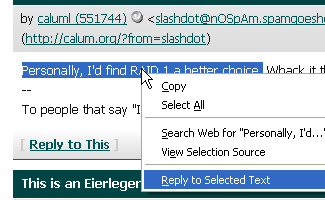
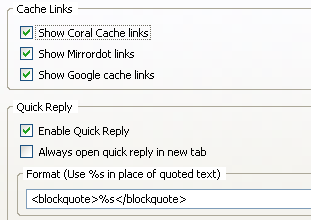
- A “Reply to Selected Text” option is added to the context menu whenever you select text in a Slashdot comment or topic. The reply box is then pre-filled with the selected text, and can be formatted using your choice of format string. The default is ‘<blockquote>%s</blockquote>’. You can also choose to always have the reply page open in a new tab or only when you middle-click the “Reply” context-menu option.
- A link is added at the end of each comment (next to the “Reply to This” link) that allows you to toggle open/closed all of that comment’s replies.
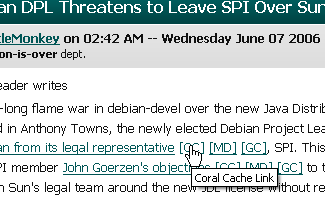
- Links to the Coral Cache, Mirrordot cache, and Google Cache are added after each link in a article description.
- An advanced set of styling options allows you to style each Slashdot section differently. For example, you could have all Slashdot sections use the style from the Apple section, except for Linux, which you could have use the Politics style. The possibilities are endless! (Well, there are actually 10! possibilities, but that’s still a lot.) The OMG!!! Ponies!!! style from April Fools day, 2006 is available as an option.
- For the links in the comment section labeled “X Replies below your threshold,” there is an option to have those comments load in the current page when you click the link rather than loading a new page. The newly loaded comments will have a pale yellow background to differentiate them once they have loaded. This also now applies to links to comments in threaded mode.
- Option to be notified when you moderator points
- When you have your maximum comment length set low, clicking on “Read the rest of this comment…” will load the full comment in place, rather than in a new page.
- Option to increase comment reply indentation.
All of Slashdotter‘s features are optional and can be disabled in the extension’s options dialog.


Leave a Reply