Firefox 3 introduced many new features for extension developers, and I decided to take advantage of some of them in order to update my Feed Sidebar extension. Version 3.0 of Feed Sidebar is now out, and these are the main features and changes I added:
- Look and feel: I updated all of the icons for the extension to blend in with Firefox 3’s new OS-specific look and feel. The sidebar’s toolbar uses the native theme icons, and the toolbar button is specifically designed to fit in on each of Mac OSX, Linux, and Windows. (The toolbar buttons for Windows, Mac, and Linux are shown respectively below.)



- Continuous updating: Feed Sidebar used to only check for feed updates when the sidebar was open; now it checks whether the sidebar is open or not (and notifies you when it finds updates). Big improvements in memory usage and performance were necessary to make this possible.
- Offline capabilities: the extension now caches all of your feeds, so if you go offline, you still have access to all of the data that was in the feeds, and you can read it while offline. When you go offline, Feed Sidebar goes into “Offline Mode”, and automatically opens the stored summary from the feed when you click on an item rather than trying to open the webpage the item references. This features makes use of the new online/offline events in Firefox 3.Here is a screenshot of what offline reading looks like:
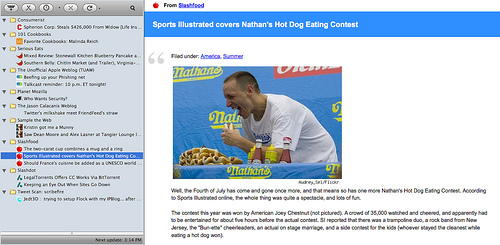
- Places integration: when you add or delete a live bookmark in Firefox 3, Feed Sidebar will detect that via Firefox 3’s nsINavBookmarksService interface. When you add a new feed, it will instantly appear in the sidebar, and the reverse is true for deleting a feed.
- Caching: as soon as you start Firefox, Feed Sidebar will fill the sidebar with the feeds you were reading the last time Firefox shut down, even if you are now offline. This is made possible via the new JSON libraries that shipped with Firefox 3.
Feed Sidebar 3.0 is now available at Mozilla Add-ons.


Leave a Reply