
Social Traffic Monitor is a plugin for WordPress blogs that monitors your blog traffic for activity coming from social news or bookmarking sites.
When someone clicks on a link to your blog on one of the major social news or bookmarking sites (currently Digg, Netscape, Reddit, Newsvine, Fark, Slashdot, Del.icio.us, and StumbleUpon), the plugin begins to log the visits to that page. This data can then be displayed in the form of a graph of visitors per hour.
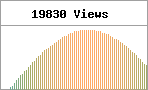
Each vertical line represents one hour, and you can customize how many hours the graph shows. You can also choose to display and link to the top referrers below the graph – a great way to prompt other users to return to those sites and vote for your story.
To install, unzip social-traffic.php and upload it to the wp-content/plugins/ directory of your blog. Activate the plugin from your Administration panel, and then, using the theme editor, add this line of code wherever you want to display the chart and/or referrers:
<?php social_traffic(); ?>
Alternatively, you can supply some custom HTML to display along with the chart and/or referrers, if they are displayed by calling the plugin like so:
<php social_traffic('<div>%s</div>'); ?>
The “%s” will be replaced by the output created by the plugin. In this instance, the div tags will only be output if the plugin has something to display.
Note: this plugin will only display the graph and/or referrers on single-post pages, and it won’t display anything unless that post has been accessed from one of the social news sites.
Note: watch the Social Traffic Monitor section of my blog for information on updates to this plugin.
Hi. Looks good from what I see of it on your site, but I can’t get it working on mine. I use WP 2.3. I have created a widget and added the code to it but all it shows is the title ‘Social Traffic’. I have tested it by clicking a link to an article of mine on bookmarked on Reddit but still no output.
wow, this is a great plugin, found it while searching for a torrent stats plugin. your plugin will come in real handy for me as I receive a lot of traffic from social networking sites, esp fark and SU.
good plugin. Actually i want to find a stumbleupon plugin that can automatically post when I have new post on my blog
Perfect idea! I am going to try to work with your plugin.
Question: is it piossible to add other social sites and remove some from list?
Excelent plugin, I’ll use it on my network of sites.
I love it! That is way cool man! The steps weren’t that complicated too, which is great.
I have bookmarked and I hope to use it in the near future. Anyway thanks
Great script and useful
This is a cool tool and something I will probably push for to my users that has wordpress.
Any plans on developing this further?
Anyway, Thank you!
Does this plugin still work, please?
Does this plugin still work :|
I’m wondering if this plugin is working as well. Had it up on my site now for a few weeks and no stats are showing.
Kool WordPress Mod :)
Does this plugin still work?
Ultimate tool to monitor the social network inbound links
Hey Christopher, this plugin looks really good and professional. I’ve just no started using it and I already love it.
Very nice. Congratulations for your plugin. It saved me some time :)
Plugin worked great before and after wordpress upgrade.. no problem for me
Really, is it still works???
I am now not certain the place you are getting your info, however good topic. I must spend some time studying more or understanding more. Thanks for fantastic info I used to be searching for this info for my mission.
The plugin latest release is the 1.3.1 and works ok on WordPress 3.3
Works well on WordPress 3.3
Social media is becoming more and more relevant these days. Especially now that Google is using Google+ with everything and watching for social indicators. Thanks for developing such a great plugin!
Thanks for this nice plugin.
It is working fine with WordPress 3.4 too.
hi, is there any way to get list of visitor’s social profiles on fb/twi/g+ (if visitor is logged in fb or twi or g+ at the time of visit to website) ?
No.
My plugin was working fine till the latest update of wordpress, What wrong with it noW?
This plugin works great! With social media being so important these days, this plugin does the job! No problems in using it on latest WP version.
This plugin works great! Thanks
Awesome plugin. I have been using it on my blog since long. Works very well.
Thank you so much for the cool plugin.
All plugins are awesome. Thanks
Hey, guys thanks for this post about social traffic monitor WordPress plugin… great job…
Useful plugin but I suggest for general sites…thanks
Thank you for this plugin ! I’vetested it with wordpress 3.4 and it’s working like a charm
The website loading speed is amazing. It sort of feels that you’re doing any distinctive trick. Moreover, The contents are masterwork. you have performed a excellent activity in this matter!