Less Talk, More Do Christopher Finke is a software engineer at Mahalo. He is available for birthday parties and bar mitzvahs.

Feed Statistics Plugin for Wordpress

Note: watch the Feed Statistics section of my blog for information on updates to this plugin.

Feed Statistics is a plugin for Wordpress blogs that tracks statistics for your RSS/Atom feeds, including the number of subscribers, which feed readers they're using, which posts they're viewing and which links they're clicking on.

To install, unzip feed-statistics.php from the zip file below and upload it to the wp-content/plugins/ directory of your blog, and activate the plugin from your Administration panel. Then, you have two ways to display your subscriber count. You can either add the following code to your theme (in your sidebar, for example):

	<?php feed_subscribers(); ?>

This will display a simple "123 feed subscribers" line of text that you can markup however you want. If your theme is widget-compatible, you can instead use the Feed Statistics widget, which will display the same text, but inside of an easy-to-manage widget. (If you want to style the widget text, it is inside a tag.)

The plugin also adds a "Feed" section to your Wordpress administration panel. This section has four subsections: Feed (Options), Feed Readers, Post Views, and Clickthroughs.

Options

Settings for which readers to count as subscribers and toggles for turning view and click tracking on and off.

Top Feeds

Displays a list of the feeds most often requested by your subscribers. Note: a subscriber that follows multiple feeds will only be counted once in the total subscriber count, but all of the feeds that they subscribe to will appear on this page.

Most popular feeds

Feed Readers

Displays which feed readers your subscribers are using.
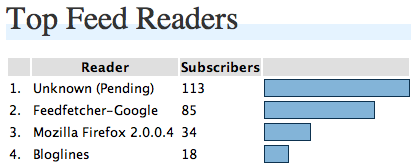
Feed Reader Chart

Post Views

If you have post view tracking turned on (it's enabled by default), this page will show the posts in your RSS feed that are most popular.
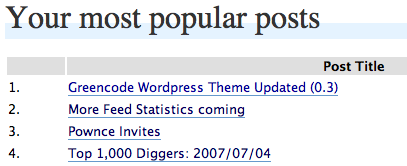
Chart of your most popular posts

Clickthroughs

If you have clickthrough tracking turned on (it's disabled by default), this page will show the links in your posts that your feed subscribers are clicking on.

Track clickthroughs on links in your feed

It will take a few days for the subscriber count to become accurate, so you may want to wait a day or two between installing/activating the plugin and publicly displaying your subscriber count.

The latest version of Feed Statistics is 1.3.1 (released on 2007-10-12).

145 Responses to “Feed Statistics Plugin for Wordpress”

  1. Adam Dempsey Says:

    Going to try it out now, sounds great :)

    Look forward to the updates too.

  2. Die Zahl der Feed-Leser ermitteln » Peruns Weblog Says:

    [...] Für Leute die Feedburner nicht mehr mögen oder noch nie gemocht bzw. genutzt haben gibt es dennoch eine Möglichkeit, die Anzahl der Feed-Leser zu ermitteln: das Feed-Statistik-Plugin für WordPress. [...]

  3. Conny Says:

    Don't work at my blog. :(

  4. Conny Says:

    I had put it into my theme faces. But do not work. I have wp 2.0.9 Is that the mistake?

  5. Connected Minds - » Plugin para estatística dos Feeds Says:

    [...] facilitar a sua vida mostrando o número de pessoas que acessam os seus feeds. Vale a pena testar. Mais informações aqui (em inglês). Compare Preços de: games, PS2, PS3, Nintendo, Wii, iPod no [...]

  6. Veg Says:

    Sounds like a nice idea but version 1.0.1 wouldn't activate in the plugin menu - died due to a fatal error.

  7. Feed Statistics WordPress Plugin » D’ Technology Weblog: Technology News & Reviews Says:

    [...] Plugin Page | Download [...]

  8. george donnelly Says:

    "Plugin could not be activated because it triggered a fatal error."

    This on WP 2.2, PHP 5.2.3.

  9. huda Says:

    sounds great, say goodbye to feedburner eh??
    I'll try this, thx...

  10. Vidas M. Says:

    Does this plugin properly deals with Google reader? Google reader groups all reads into one and reports in the link how many subscribers are. Will this work?

  11. Christopher Finke Says:

    Vidas: Yes, this will correctly count subscribers reported in the user-agent string by third-party feed readers such as Google Reader, Netvibes, etc.

  12. Vidas M. Says:

    Installed, tested, perfect. Thank you very much Christopher! I was looking for this for such long time. I did not wanted to redirect my subscription to feedburner, so now I have full control of my blog and I know how many people are reading it.

    Thank you very much again!!!!!

  13. carsten Says:

    Der Link auf das Plugin ist halb kaputt ;-)

    Das Linkziel sollte auf feed-statistics-1.0.3.zip lauten. :P

  14. jaggs Says:

    Hmm..got an error -

    WordPress database error: [Access denied for user... blah...
    CREATE TABLE IF NOT EXISTS wp_feed_subscribers ( subscribers INT(11) NOT NULL DEFAULT 0, identifier VARCHAR(255) NOT NULL DEFAULT '', date datetime NOT NULL DEFAULT '0000-00-00 00:00:00', PRIMARY KEY (identifier) )

  15. Word&Press Mu » Blog Archive » Plugins - 23 June Says:

    [...] management page. There is also an option for placing the category post count inside the link. Feed Statistics monitors and displays the number of people who read your blog via the RSS feed Information Bar [...]

  16. Christopher Finke Says:

    jaggs: That looks like your database user does not have "CREATE TABLE" permissions. You'll have to get that table created manually by a user that does have those permissions.

  17. Jaggs Says:

    Thanks Christopher.

  18. gemme Says:

    Thanks for this brilliant script. I was never too much thrilled of giving the control of my feed away and this is the plugin I was waiting for. Thanks a lot.

    I'm looking forward to new features:) Maybe the features FeedBurner Stats PRO is offering...

  19. Daniel Says:

    have installed version 1.1.1 and now appears a new FEED top menu. But when I click on it a "not found page" appears.

    Thanks!

  20. Christopher Finke Says:

    Daniel, which version of Wordpress are you running? When you get the error, what is the URL in the address bar?

  21. Jaggs Says:

    Christopher, this is a superb plugin (great upgrade too). I'm intrigued as to why the clickthrough feature is not default enabled while the post views is? Is there some performance penalty? And does it play nice with excerpted feeds which have images delivered to the readers?

  22. Christopher Finke Says:

    Jaggs: There are 2 reasons for not enabling the clickthrough feature by default.

    #1 is that it's more invasive than the post view tracking is, in that it actually modified the content of the post by changing the links. This means that readers won't be able to tell exactly where the links lead, and that might be a problem for some.

    #2 is that when clickthrough tracking is turned on, if your site goes down for whatever reason, all of the links in your feed are now dead as well, even if the feed is already cached.

    There is a small performance hit in that every outgoing link in your feed is routed through your own site first.

    I know of no incompatibilities with excerpted feeds.

  23. dP Says:

    I wonder if there is a way to manually add some feed that comes in a bit differently? LiveJournal has the capability of subscribing to a feed and then making that feed available to its members for a feed on the Friends Page.

    Right now, my Feed Widget says I only have one subscriber from LiveJournal, which is the webmaster. But when I look at my logs, the feed from them reads like this:

    "LiveJournal.com (webmaster@livejournal.com; for http://www.livejournal.com/users/revisionnotes/; 11 readers."

    In other words, they have set up my blog as a mirror blog on their site (so to speak), which is accessed only by the webmaster and then directed to the eleven readers. But it still tells how many readers there are from LiveJournal.

    So--anyway to automatically add those into the feed count? Or do I have to always look at my log for the number of feeds from LiveJournal? The ins and outs of feed counts!

    Thanks!
    dP

  24. jaggs Says:

    Thanks Christopher, that's cool. The Post View tracking is not working for me, but I think that's a result of my strange feed structure. However I do also note that there are a *lot* less Google Reader stats coming in for my feeds than Feedburner showed when I was running that for a while. I'm wondering whether you're picking them all up...?

  25. Daniel Says:

    In my website is not working property, when I go to the admin and click in FEED top menu, the page do not exist :-(

  26. XIII Says:

    Can't wait to get home and try this, this would negate the main reason I've been looking at FeedBurner.

  27. Markus Says:

    Daniel:
    Had the same problem on a wordpress blog, too. I did the mistake to place the file feed-statistics.php in a subfolder under plugins/ .
    After moving feed-statistics.php to /wp-content/plugins/feed-statistics.php everything works fine.
    HTH

    Thank for the plugins, it's a very nice thing for stat-addicts who don't want to be burned by feedburner or similar services ;)

    cheers
    markus

  28. Gemme Says:

    Very nice update of the plugin, it gets better and better.

    I have a question about the the clickthrough feature

    You mention:

    #1 is that it's more invasive than the post view tracking is, in that it actually modified the content of the post by changing the links. This means that readers won't be able to tell exactly where the links lead, and that might be a problem for some.

    This only applies (and forgive my ignorance here) to the links in the feed I guess and not to any links of the website, right?

    Thanks again.
    Thanks

  29. Christopher Finke Says:

    Gemme: That is correct.

  30. dP Says:

    A question about the stats. You allow the user to set how many days the program will look at. When I set it to 2 days v. 60 days, the answer if very different. I realize that it is dependent upon how many times your feed is accessed and that's why the results vary.

    Is there an industry standard for this--you can officially say your Feed has this many subscribers, based on a certain number of days of activity? Or is this too new a count to have a standard? How many days does Feedburner, for example, count?

    Thanks!
    dP

  31. Randy W. Sandberg Says:

    Hello Chris,

    I'm having an issue with Feed Statistics version 1.1.2. It activates, but when I go to any of the Feed Statistics' panes, I see the following error message:

    WordPress database error: [Table 'araa_home.wp_feed_subscribers' doesn't exist]
    SELECT SUM(subscribers) total FROM wp_feed_subscribers WHERE (date > '2007-08-03 15:39:59') OR ( LOCATE('###',identifier) != 0 AND date > '2007-07-28 15:39:59' )

    P.S., I'm using PHP 4.3.11 and WordPress 2.2.2.

    Thanks in advance!

    Randy

  32. Christopher Finke Says:

    Randy - Does your Wordpress DB user have CREATE TABLE permissions? If not, you may have to create the tables manually. Let me know, and I can send you the SQL.

  33. Randy W. Sandberg Says:

    Hey Chris,

    Thanks for the SUPER fast response! As for my reply... I think so. I say this as a complete rookie in regards to working with mySQL. Also, based on the fact that I have successfully installed many other plugins that have been able to create their own tables. How can I know for sure?

    Thanks in advance,

    Randy

  34. Randy W. Sandberg Says:

    Hey Chris,

    Oh, my WordPress user! Yes, I'm pretty sure I have CREATE TABLE permissions being that I am the administrator. The one strange thing is that a while back I successfully installed your plugin (Feed Statistics v???). Then, for whatever reason, I removed your plugin and dropped the associated mySQL table(s). Could this action of mine have caused the issue. And, if so, how can I fix it?

    Thanks in advance again!

    Randy

  35. Christopher Finke Says:

    Yes, that would explain it. To avoid doing extra queries, the plugin checks for a stored version number. I think if you delete the row in wp_options where option_name equals feed_statistics_version, and then just visit one of the Feed admin pages, it should recreate the tables.

    Chris

  36. Peter Says:

    I am a WP hosted user. Assume this only works for WP.org users. Is that right?

  37. shanX Says:

    Hi Chris,

    Great work, Thanks. A plugin, I have been searching for sometime, as an alternative for Feedburner....

    But not working for me :(

    WP private-hosted (on a sub directory of the domain), PHP 5, Unix and plugin installed/activated succesfully. But doesnt show any stats, stats area is blank, although it loads. It's been 3 days so far, but feed has been requested several times every hour. Has this gotta do something with PHP version??

  38. Azz Says:

    In the next version do you think is possible implement a way to know which feed the subscribers are reading ? For example a user could be subscribed to a subcategory feed

    http://www.mysite.com/category1/feed

    could be interested know which feed a subscriber is reading :)

  39. Andreas Says:

    I installed the plugin some days ago, but it's still telling me "0 Feed Subscribers". That's odd, because I know at least two people for sure, who are subscribed to my feed (using bloglines.com).

    Only at Feed -> Post Views I get results. The rest is still empty.

    Any idea what went wrong and what I can do?

  40. Andreas Says:

    Maybe the same problem as shanX (nr. 43)? Hmmm...

  41. Andreas Says:

    No idea, anybody? :-(

  42. heiste Says:

    @ Andreas: here its the other way around. I have 47 feed-readers (?) but no popular posts. Did you look in your access.log file. I always have a 404 when somebody is reading a post via rss. it logs like GET /wp-content/plugins/feed-statistics.php?view=1&post_id=318 HTTP/1.1" 404 315.

    Any help Chris?

  43. Tomislav Says:

    Hi Chris,
    great plugin but it will be even better when I get it running :)
    Check this:

    WordPress database error: [You have an error in your SQL syntax. Check the manual that corresponds to your MySQL server version for the right syntax to use near 'ON DUPLICATE KEY UPDATE date=NOW(), user_agent='Moz]
    INSERT INTO wp_feed_subscribers SET subscribers=1, identifier='89.164.8.136', user_agent='Mozilla/5.0 (Windows; U; Windows NT 5.1; en-US; rv:1.8.1.6) Gecko/20070725 Firefox/2.0.0.6', date=NOW() ON DUPLICATE KEY UPDATE date=NOW(), user_agent='Mozilla/5.0 (Windows; U; Windows NT 5.1; en-US; rv:1.8.1.6) Gecko/20070725 Firefox/2.0.0.6', subscribers=1

  44. Christopher Finke Says:

    Tomislav: it looks like you're running an older version of MySQL that doesn't support the " ON DUPLICATE " syntax.

  45. Nathan Pralle Says:

    Like Andreas, I was getting no hits on my statistics until I modified the code slightly. The problem is that the standard feed URL for Wordpress ends up being like this:

    site.com/blog/index.php/feed/rss/

    Under the function, "is_feed_url()", it checks for the basename of the URL and uses that in a CASE statement to see if it's a valid feed URL. Well, the basename of the above ends up being "feed", not one of the choices in the CASE.

    So, by adding the line below, I got mine to work:

    case 'feed':

    This was added on line 239 of the current version, so it looks like this:

    case 'wp-rdf.php':
    case 'wp-rss.php':
    case 'wp-rss2.php':
    case 'wp-atom.php':
    case 'feed':
    return true;
    break;

    That seemed to do the trick. YMMV.

    Nathan

  46. Nathan Pralle Says:

    CORRECTION: I had to add THREE cases to the switch to make it work -- adding 'feed' only fixes it for standard RSS -- RSS2 needs 'rss2' and Atom needs, strangely enough, 'atom'. So you end up with a switch that looks like this:

    case 'wp-rdf.php':
    case 'wp-rss.php':
    case 'wp-rss2.php':
    case 'wp-atom.php':
    case 'feed':
    case 'rss2':
    case 'atom':
    return true;
    break

  47. Andreas Says:

    Hi Nathan,

    thanks a lot. I tried you codechange, and it seemed to work. But I did get errors if someone wanted to subscribe to my feed (a SQL-error); comments worked.

    Strange.

    I disabled the plugin again.

    Greetings,
    Andreas

  48. heiste Says:

    Hello Christopher,
    just updated your plugin. On the mainpage I get this SQL error:
    [Can't group on 'identifier']
    SELECT subscribers AS total, CASE WHEN SUM(subscribers) = 1 THEN identifier ELSE CONCAT(identifier, feed) END AS identifier FROM wp_feed_subscribers WHERE ( (date > '2007-08-28 22:38:59') OR ( LOCATE('###',identifier) != 0 AND date > '2007-08-08 22:38:59' ) ) GROUP BY identifier

    it still shows Top Feeds and Feed Readers. Post Views and Clicktroughs still missing as described above at 48. Do have any hints. Thank you very much

  49. Not specified Says:

    I noticed that google webmaster tools now report rss subscribers information and wanted to ask you this.
    Google reports following "Google Subscribers":
    http://.../Blog/?feed=atom 3
    http://.../Blog/?feed=rss2 15
    http://.../Blog/feed 4
    http://.../Blog/feed/atom 4
    So total on google seems to be: 3+15+4+4=26.

    Feed statistics reports google feedreader as:
    Feedfetcher-Google 19

    Any idea why there differences?

  50. Christopher Finke Says:

    Google could be reporting subscribers over a longer period of time than Feed Statistics; that could account for the discrepancy.

  51. MetaActive.com Says:

    Thank you very much for updating your feed stat plug in.This release was better in someway than the older one.One feature I'd really like was a way to distinguish between search engine bots and users.

    Thanks again.

  52. MetaActive Blogging Says:

    Thank you very much for updating your feed stat plug in.This release was better in someway than the older one.One feature I'd really like was a way to distinguish between search engine bots and users.

    Thanks again.

  53. Alexander Lazarev Says:

    hey, nice plugin but not work with last wordpress 2.3 and mysql 5.x
    got error
    wp_feed_subscribers' doesn't exist]
    SELECT subscribers, CASE WHEN subscribers = 1 THEN identifier ELSE CONCAT(identifier, feed) END AS ident FROM wp_feed_subscribers WHERE ( (date > '2007-10-09 14:48:14') OR ( LOCATE('###',identifier) != 0 AND
    its after install

  54. Christopher Finke Says:

    Alexander: Try downloading version 1.3.1 and then calling your RSS feed with "?reset_feed_statistics=1" on the end. This will try and recreate all of the tables that Feed Statistics uses.

  55. Alexander Lazarev Says:

    Christopher,
    got error again, i think here is problem with sql:

    WordPress database error: [Specified key was too long; max key length is 1000 bytes]
    CREATE TABLE IF NOT EXISTS wp_feed_subscribers ( subscribers INT(11) NOT NULL DEFAULT 0, identifier VARCHAR(200) NOT NULL DEFAULT '', feed VARCHAR( 200 ) NOT NULL, date datetime NOT NULL DEFAULT '0000-00-00 00:00:00', user_agent VARCHAR(255) NOT NULL DEFAULT '', PRIMARY KEY (identifier, feed) )

  56. Ray Marotta Says:

    Help!
    Need the bit of php for wordpress so it will display on my site! - not listed in your notes above.....

  57. George Says:

    got this error:

    WordPress database error: [Table 'crazynla_wrdp1.wp_feed_subscribers' doesn't exist]
    SELECT subscribers, CASE WHEN subscribers = 1 THEN identifier ELSE CONCAT(identifier, feed) END AS ident FROM wp_feed_subscribers WHERE ( (date > '2007-10-13 08:42:13') OR ( LOCATE('###',identifier) != 0 AND date > '2007-10-07 08:42:13' ) ) ORDER BY ident ASC, date DESC

  58. Aaron Says:

    Great plugin! I really love it! Now I need not worry about burning all my feeds through FeedBurner!!

  59. djStelios Says:

    @ Alexander:
    I had the same problem. This error occurs because I'm sure you have UTF8 collation at your database. UTF8 needs 3 bytes for each character instead of 1.

    Try to change the identifier and feed lengths from 200 to 166. I'm not sure if it's 100% working solution but I had to installation problems with this alter.

  60. Christopher Finke Says:

    @djStelios, @Alexander: Changing the feed column to have a length of 120 should fix the problem and not cause any trouble.

  61. jaggs Says:

    Chris, Google Reader stats have now completely disappeared from my installed Feed statistics. Weird? Everything else seems to be fine.

  62. Laundro Says:

    Awesome plugin! Thanks so much for this!

  63. Roman Nastenko Says:

    WordPress database error: [Table 'blogdeluxeru.wp_feed_subscribers' doesn't exist]

  64. snowgirl Says:

    tahnkss

  65. Anmol Mehta Says:

    Any thought on DPs question above regarding how many days to set the collection to? Such as what feedburner uses, or what is a typical "standard"? The results vary vastly based on this value.

    Any input is appreciated and thanks for the great plugin.

  66. Anmol Mehta Says:

    Hi,

    How do I disable this plugin? As soon as I disable the plugin my feed no longer validates? When I re-enable it, it validates again. I am doing some trouble shooting on my feed and need to disable this plugin temporarily.

    Once enabled, does it leave behind debris which is not removed when disabled? Please help.

    my feed URL is http://www.anmolmehta.com/blog/feed

    Thanks,
    Anmol

  67. Anmol Mehta Says:

    More specifically, once I turn on click tracking for which links my subscribers click and then turn off the option. The feed invalidates w/ following error...

    Sorry

    This feed does not validate.

    *

    line 223, column 1570: Invalid character in a URI: '"' (17 occurrences) [help]

    ... DE">GRATITUDE]]>

  68. Insomne Says:

    Im going to try the plugin
    Thanks

  69. Vladimir Says:

    #45 & #43

    I think the problem is in functions:

    function clickthrough_replace($content)
    function postview_tracker($content)

    lines:

    $redirect_url = get_bloginfo('url') . "/wp-content/plugins/feed-statistics.php?url=";

    $content .= ' ';

    Note: get_bloginfo('url') is same as home URI (Blog address). I Think that is OK if you install WordPress in site root. In a case that your install directory is different, you should use get_bloginfo('wpurl') (WordPress installation URI) (Wordpress Codex).

    I replaced get_bloginfo('url') with get_bloginfo('wpurl'). Time will tell is it ok? Hope it is :))

  70. cross Says:

    Great!

    A lot of time I tried to fined this plugin, and only now will use on my blog.

  71. Heiko Says:

    Do you know that your plug-in will working with WordPress 2.5 or not?

  72. Christopher Finke Says:

    Yes, it works with Wordpress 2.5.

  73. BradyDale Says:

    I've added the plug-in and it's working well. I just wish I knew what the line of code was that would allow me to display my feed stats on my homepage.

    There's no code after you write "the following line of code" up at the top.

  74. links for 2008-03-28 » a big guy in a big city Says:

    [...] Feed Statistics Plugin for Wordpress :: Now I Have a Blog Too (tags: wordpress plugin rss feed plugins statistics tool wordpress-plugins) [...]

  75. Christopher Finke Says:

    BradyDale: Sorry about that, I've fixed it so you should be able to see the code you need.

  76. Hello, Wordpress 2.5! » Faces of Yve Says:

    [...] Feed Statistics 1.3.1 [...]

  77. BradyDale Says:

    I have a question... I don't see an FAQ for this page.
    OK, you have the Feed Statistics set to 3 Days of feeds by default. is there any reason not to raise that to a higher number?

    I guess what I'm asking is... if a person checks your feed multiple times over whatever period you have Feed Statistics tracking, does it count them as more than one person?
    Or does Feed Statistics know that it's the same person opening up his Bloglines account for the 2nd time?

    Do you want to keep the number smaller for a more modest, accurate count... or does Feed Statistics just know when people are repeat visitors and not report them?

  78. Christopher Finke Says:

    BradyDale: Feed Statistics doesn't count the same person checking your feed multiple times as multiple people. I use 7 days as my default, and it seems to be pretty accurate. 3 was arbitrarily chosen as the general default; feel free to change it.

  79. BradyDale Says:

    Awesome! Thanks for the clarification. I have mine set at 20. Why leave anyone out? I was so worried that I really had 5 people who checked the feed every day. Great news!!!
    Thanks for this!

  80. Wordpress 2.5 and plugins | 12 Witnesses Says:

    [...] Feed Statistics - Most of our blogs are read in feeds, but they aren’t counted by Statcounter codes that we embed in the page. This plugin lets you see some information about how many people are grabbing your feed, and which posts they pick up. [...]

  81. WORDPRESS GOD: 300+ Tools for Running Your WordPress Blog Says:

    [...] Feed Statistics - Monitors your feeds and tells you which readers are being used, the links that readers click on, and which stories they are reading. [...]

  82. The Ultimate WordPress Plugin Library : Get More Reviews Says:

    [...] Feed Statistics - Monitors your feeds and tells you which readers are being used, the links that readers click on, and which stories they are reading. [...]

  83. Giysi Giydirme Says:

    Very nice plugin. Thanks.
    Keep up the good work.

  84. Jonathan Says:

    How can I test to make sure this plugin is actually working? I have had it installed for several days and it still says I have zero subs, and I am sure I have at least one or two, since I'm subscribed to my own feed.

  85. Wowbagger.de Says:

    Works perfectly!

    Thanks a lot!

  86. Feedburner per un blog o CMS: come tracciare al meglio i feed Rss | Antezeta Web Marketing Says:

    [...] gli utilizzatori di WordPress, Christopher Finke ha scritto un ottimo plugin che traccia gli accessi ai feed e i click through ai post. Feedstats DE consente la visualizzazione [...]

  87. asaaki Says:

    i've got trouble with the tracking-function. the generated [...]/feed-statistics.php?url=[code] links don't work and i get an error 500.

    i use wordpress 2.6

    do anybody know this problem and has fixed it?

    thank you!

    -aki

  88. Angsuman Chakraborty Says:

    Just activating it was enough to bring down my blog. The front page was showing blank. All other pages were attempting to download a file instead of displaying it.
    I haven't investigated in details but that enough to disable the plugin once and for all.

    I am using the latest version of WordPress. Any idea / fix?

  89. My Wordpress Plugins - FrancescoMugnai.com Says:

    [...] Feed Statistics Whit this plugin you can track statistics for your RSS/Atom feeds, including the number of subscribers. [...]

  90. Manish Jethani » Blog Archive » Feed Statistics plugin Says:

    [...] you want to track the number of subscribers to your WordPress-powered blog, I recommend the Feed Statistics plugin by Christopher Finke. Not only does it give you a subscriber count for each feed, it also [...]

  91. N.B. Says:

    Hello,

    Today I noticed that Wordpress plugins reported that there is new version of Feed Statistics plugin: 1.3.2. I used automatic update and it appears to be succesfull. But after that in admin area when I go to "FEED" menu, i am getting 404 error. Any idea why? Also, why there is no info about 1.3.2 release in your blog?

  92. Christopher Finke Says:

    N.B.: I'm sot seeing that problem; it's probably related to the way your blog is set up. What is the URL to your wp-admin/ directory? (i.e., is it http://myblog.com/wp-admin/, or is it http://mysite.com/stuff/blog/wp-admin/ ?)

  93. N.B. Says:

    URL to my wp-admin folder is:

    http://www.MyWebSite.com/MyBlogName/wp-admin/

    When I click on "Feed" link it goes to the page:

    http://www.MyWebSite.com/MyBlogName/wp-admin/feed-statistics.php

    I checked that folder and there is such file feed-statistics.php in wp-admin folder.

  94. Neuro Says:

    Hello, great plugin, i have only 1 problem,
    when i click the 'feed' link at the admin section, it goes to feed-statistics.php page which cannot be found. Anyone fixed this?

    Thanks for the plugin!

  95. Kris Says:

    I have the same problem with wordpress 2.6.2.
    When i click the 'feed' link at the admin section, it goes to http://www.MyWebSite.com/MyBlogName/wp-admin/feed-statistics.php page which cannot be found.

    Thanks for the plugin!

  96. D'Arcy Norman Says:

    I'm noticing the same thing. The plugin-generated link to wp-admin/feed-statistics.php fails, but the direct URL of wp-admin/admin.php?page=feed-statistics.php still works fine (but it's not used on the Feed link)

  97. a Says:

    same problem as 96, 95, 94 --- am not sure if this is working anymore.

  98. Selil Says:

    I had the same problem as 96 through 97. The issue was that the feed-statistics.php file was deleted from the plugins director (see the read me file for details). This happened during the auto update process. Reinstalling as if it was never there fixed it and the 404 error is just fine. My guess is something got hinked up (tricky technical term) in the auto update script. feed-statistics.php was nowhere to be found on my webpage. Maybe just me but I'm betting not.

  99. a Says:

    I've tried to uninstall, re-install, deactivate, reactivate - same problem. The feed-statistics.php file is located inside of the plugin directory, but pointing to it there just gives a blank page.

  100. D'Arcy Norman Says:

    I've tried manually installing the files, and they all appear to be in place, but I still get a 404 when going to the Feed page of my WordPress admin interface, but manually entering the URL /wp-admin/admin.php?page=feed-statistics.php gets the page. It's there, and it's working, but the link is busted.

  101. Scott Martin Says:

    Same problem as post 95.
    I'm running WP 2.6.2 and MSQL version 5.0.67 on Dreamhost. I'm also using the Fluency 1.2 admin plug-in if that makes a difference, and Feed Statistics 1.3.2. Everything is up to date.
    When I click on "FEED" from the WP admin area it goes to
    http://www.on-sight.com/wp-admin/feed-statistics.php
    which says file not found.
    The WP admin FEED button used to goto
    http://www.on-sight.com/wp-admin/admin.php?page=feed-statistics.php
    which does work.

    I'm not an advanced user but can follow directions well. IS there any way I can change the link so that it operates correctly? I read post #32 and am not sure if that applies to me or how I might change it. Could this have something to do with using permalinks instead of the default link style?

  102. Frank Says:

    I've got the same problem as #95 and #101. I have dug through the code and compared it with the menu structure of other plugins and can't seem to figure out why it's not working. It will work if I add a admin.php?page=feed-statistics.php to the end of the URL so it's not tha big a deal, but it does get annoying.

  103. David Phillips Says:

    I think it has to do with wordpress 2.6.2. It stopped working for me when I moved to 2.6.2. I had the previous version of Feed stats 1.3.1 and it was doing the same thing, but this worked in 2.5. Wish I had a reason for it.

  104. A Mind @ Play Says:

    [...] Feed Statistics - Neat little plugin to keep track of those feed subscribers without using an external service like [...]

  105. Strubbl Says:

    I have created a file feed-statistics.php. I uploaded it to the wp-admin dir. the content of this file is:
    [code]

    [/code]
    I know, workaround, but it helps ;)

  106. Strubbl Says:

    it is a php file with this content:
    header("Location: admin.php?page=feed-statistics.php");
    exit();

  107. John Baker Says:

    I can't find a way of upgrading from version 1.1.1 to 1.3.2.
    For several months the earlier version worked fine. But then when I upgraded automatically to 1.3.2 I lost the php file. Next step was to upgrade by downloading the new version by hand, and although that seemed to work satisfactorily, it didn't actually collect information and me subscriber count slowly evaporated until it was so low I had to take the count off my site.
    Still tinkering, but I'm back to 1.1.1 now and the count seems to be very slowly increasing.
    I'd like to carry on using this plugin, as when it was working, it gave valuable info, but does anyone know how to get the latest version back into gear?

  108. Matthew Dryden Says:

    Hey Chris,

    I've been using your plugin for about a month now. I've recently made the jump over to FeedBurner. I did it through the redirect plugin, "Feedburner Feedsmith" and it seemed to work fine. It's been about a week now, and my FeedBurner is claiming 14 subscribers while your plugin is claiming 85. Here is a list of the plugins I use:

    Askimet
    CommentLuv
    FeedBurner Feedsmith
    Feed Statistics (yours)
    Google Analytics
    Hello Dolly
    Post-Plugin Library
    SEO Title Tag
    Similar Posts
    WordPress.com Stats
    WordPress Automatic Upgrade.

    I am using the Tarski theme.

    Hope this helps.

  109. Ginchen Says:

    Love this plugin!

    But _please_ give us a hint on how to make the link in the admin panel point to /wp-admin/admin.php?page=feed-statistics.php instead of /wp-admin/feed-statistics.php :(

  110. Markus Väth Says:

    Hi,

    one question concerning the reliability:

    How does your plugin deal with things like reloading a site or same computer, different IP (because of going offline and back online in a short period of time)?

    I'm asking because since I established your plugin - which is, by the way - really great - I got almost 240 new feed subscribers within a month. Okay, my blog's good, but not THAT good, you know. And in the backen there are over a dozen of different feed readers which were recognized by the plugin.
    So I ask myself if there are "traps of duplication" when it comes to subscribers.

    BTW: I use version 1.3.2.

    Thanks in advance,

  111. Kait Nolan Says:

    Okay I'm new to the WP hosting thing, but I've successfully installed the plugin (1.3.2)in the correct folder and activated it, but I keep getting an "oops page not found" error when I click on any of the Feed menu items. I'm running WP 2.6. Suggestions?

  112. Phat^Trance Says:

    Does this plugin also count the BOTS / scripts that search the site for feeds? or does it ONLY work with "real humans"

  113. David Phillips Says:

    Chris,

    I did the work-around for the admin section and that's great. However, I'm noticing another issue after going to 2.6+. When I checked "Track which links your subscribers click", when a link in the reader is clicked, I get a 404 error on my site. It's pulling the correct link from the DB, and I can echo it right before the header("Location: " ) command, but it's not redirecting. It's just telling me the standard 404 error page.

    I don't know what 2.6 did to cause problems with this (and other plugins) but I a bit peeved.

  114. Erin Says:

    Chris - I am trying to better understand what exactly your plugin measures. Under Feed Readers, it says I have 32 subscribers using Internet Explorer 6.0. How is that possible since ie6 does not have feed reading abilities as far as I know?

  115. 30???????Wordpress?? Says:

    [...] Feed Statistics - ??Feed?????? [...]

  116. Mina - statistikamaniakk » Aarne bloog Says:

    [...] Feed Statistics plugin - loeb kokku, mida ja kui palju mu feedist loetakse, milliseid linke klikitakse, jne. [...]

  117. Eric Says:

    Hi.

    I found a slight problem with your script, which had to do with information getting added to the header that should not be there, I believe (potentially caused by other plugins). The problem is that you have the following in the code:

    header("Location: ".$url);
    return;

    This returns from the function but it does not prevent other parts of wordpress of adding stuff to the http header.

    I changed it to...

    header("Location: ".$url);
    exit;

    ... and that made it work.

  118. Minu WordPress’i pluginad VOL4 » Aarne bloog Says:

    [...] Feed Statistics - peab arvet selle üle, et milliseid postitusi mu blogist loetakse RSS feedi kaudu ja milliseid linke sealt klikitakse ning milliseid lugejaid selleks kõigeks kasutatakse. Kuna kogu muu feedindus on suunatud FeedBurner’i peale, siis saaks ka sealt statistikat aga oma blogist on lihtsam ja kiirem vaadata. Kaalun siiski sellest pluginast loobumist. [...]

  119. Wordpress?????????? - memory ’s blog Says:

    [...] DownloadCounter - ????????????????? Dschini Bot Checker - ????????????????????????????? Feed Statistics - ????Feed??????????? FeedBurner SiteStats Enabler - ?????????FeedBurnner??????? FeedBurner [...]

  120. Name Says:

    This doesn't work - page not found in admin panel. Very poor.

  121. Karl Wångstedt Says:

    For all you guys that have a problem with the admin menu giving you a 404. Go to the function add_options_menu() in feed-statistics.php (around line 345) and replace basename(__FILE__) with __FILE__.

    That seems to take care of it.

  122. ??????? ??? Wordpress ? ????????? ?? ??????? ? 3-? ??????. ????? 2. On-line ??????? ???????????? Says:

    [...] ????? ??????? ??, ? ????? ??????? ?? ?????????. Feed Statistics - ?????? ????????????? Rss ? ??????????? ?????? ?? [...]

  123. 30+ WordPress Plugins for Statistics Says:

    [...] Feed Statistics - Monitors your feeds and tells you which readers are being used, the links the readers click on, and which stories they are reading. [...]

  124. Feedburner & Google - eine gute Idee? | Online gut, alles gut!? Says:

    [...] Beim Start dieses Blogs hatte ich versucht, den RSS-Feed über Feedburner einzurichten. Leider kam es dabei immer wieder zu Problemen, die bei Feedburner als “Server Time Out” auf Seiten meines Providers beschrieben wurden. Weder Provider noch Feedburner konnte mir dabei helfen - ich habs auch ehrlich gesagt nicht sonderlich verfolgt, sondern derweil ein anderes Plugin verwendet, welches mir ein paar Abonnenten-Statistiken aufzeigen konnte (Feed Statistics von Christopher Finke). [...]

  125. En.nicuilie.eu Blogs » Top 1000 WordPress Plugin Authors Says:

    [...] Feed Statistics [...]

  126. marcO Says:

    Hi there!

    Very nice plugin! But i found one incompatiblity using wp27 and WP Greet Box (http://omninoggin.com/projects/wordpress-plugins/wp-greet-box-wordpress-plugin/) The Greet Box plugin uses the ref data for displaying greetings to users. When using togehter with your plugin the greetings are not shown anymore. Most likely because of the fact that the ref data is gone after passing your plugin. Can you confirm or correct this in some kind of way?

    --rgds marcO

  127. Mr Risk Says:

    Hi Chris,

    Great plugin! But I can only get it to partially work.

    When I try to click on a submenu item, I get a blank page and the URL link generated is:
    http://www.traderrisk.com/wp-admin/feed-statistics.php?page=feed-statistics.php

    What is the actual page supposed to be?

    Thanks

  128. ginny shope fowler Says:

    Hi Chris,
    My problem must be somewhere in my blog and not with your plugin, because it works great on other blogs I'm running. But maybe you have an idea where my problem lies...thought I'd give it a shot.

    When I click on a link in a post from Google Reader, I get a 500 server error. The link looks like this:
    http://www.soulrinse.com/wp-content/plugins/feed-statistics.php?url=aHR0cDovL3d3dy5zb3Vscmluc2UuY29tL3NvdWxibG9nL3JlYm9vdC8=

    Any idea how I've managed to screw this up? Thanks.

  129. 300+ Tools for Running Your Wordpress Blog « Castalie’s Blog Says:

    [...] Feed Statistics - Monitors your feeds and tells you which readers are being used, the links that readers click on, and which stories they are reading. [...]

  130. dl_blog » Wie ermittle ich meine Feedleser? Says:

    [...] zweites habe ich das Feed-Statistics Plugin von Christopher Finke im Einsatz. Es soll zeigen, wie oft ein einzelner Artikel im Feed [...]

  131. Mário Gamito Says:

    Dear Christopher,

    I don't mean to be bold here, but perhaps you should rewrite this line of code:

    require("./../../wp-config.php");

    to something more generic that covers all possibilities. Being the most important one, the cases that have wp-config.php one directory up the WP's DosumentRoot for security reasons (I'm one of those and there a lot of others like me).

    Just because of this, all database creation go drown the drain during the installation process.

    I don't dare to make a code sugestion... I'll leave that to you (if you consider what I've written earlier).

    Kind Regards,
    Mário Gamito

  132. Edward Harrison Says:

    @marcO from 7 Jan 2009,

    I am having the exact same problem with Feed Statistics and GreetBox. They are incompatible in their current form.

    Christopher, do you have a fix for this?

    Edward

  133. 21 Best WordPress Plugins Says:

    [...] Feed Statistics - Tells you who is reading your blog via RSS and what they are [...]

  134. Bookmarks ausgemistet - Der Rest! « Leseliste Says:

    [...] Feed Statistics Plugin WordPress [...]

  135. Videastudio Says:

    Hi Christopher, great work. The plugin is working ok and showing stats in the WP dashboard from one day after installed. I'm using the last WP version. Just a thought, but since upgrade to 2.7 version, every plugin works like a charm.

  136. TOP 21 WordPress Plugins - Workin th’Press for All It’s Worth | Fluent Search Marketing - SEM Consultants - Search Engine Optimization Says:

    [...] Feed Statistics - if you don’t use Feedburner or IceRocket or other tool [...]

  137. TOP 21 WordPress Plugins - Workin th’Press for All It’s Worth | uber.la Says:

    [...] Feed Statistics - if you don’t use Feedburner or IceRocket or other tool [...]

  138. Wordpress????? | ??? Says:

    [...] Feed Statistics [...]

  139. Tom Says:

    @ginny shope fowler: In your 'Feed Options' uncheck de box which says 'Track which links your subscribers click'

    Worked for me!

  140. BottledWorld Says:

    Looks like an interesting plugin. I wonder if it work better then Google Webmaster tools for tracking subscribers?

  141. 11 ways to increase your RSS feed subscribers count | Design daily news Says:

    [...] This one probably sounds obvious for all seasoned bloggers, but Feedburner is a very useful service. It lets you count your subscribers, which is important if you want to track your progress. If you don’t want a third-party service hosting your feed, take a look at the Feed Statistics plugins for WordPress. [...]

  142. 11 ways to increase your RSS feed subscribers count | Best Design Content Says:

    [...] This one probably sounds obvious for all seasoned bloggers, but Feedburner is a very useful service. It lets you count your subscribers, which is important if you want to track your progress. If you don’t want a third-party service hosting your feed, take a look at the Feed Statistics plugins for WordPress. [...]

  143. Wordpress Plugins « Janasworld Says:

    [...] Feed Statistics 1.3.2 Compiles statistics about who is reading your blog via an RSS feed and what they’re [...]

  144. 9 Maneiras de aumentar os seus subscritores. « Xigli Says:

    [...] eventualmente não quiser usar serviços third-party, use o Feed Plugin para monitorizar os seus [...]

  145. A big thanks to all my RSS subscribers | Tech and life Says:

    [...] added the Feed Statistics plugin a couple of months ago and was pleased to find I had 7 loyal readers then. To my utter [...]

Leave a Reply