
Due to the upcoming deprecation of XUL-based add-ons, I am stopping development and support for this add-on. E-mail me if you’d to take over development.
Comment Snob is an extension for Google Chrome and Mozilla Firefox that filters out undesirable comments from comment threads on the Web. You can install it in Chrome or install it in Firefox.
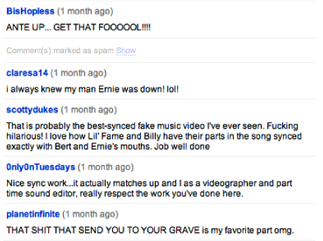
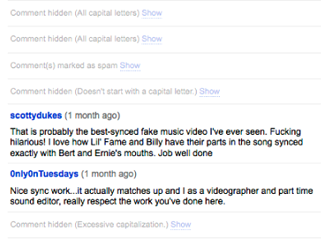
It comes with support for YouTube by default, but you can add support for many other sites by installing Comment Snob rules. For each rule that you install, you can choose from the following filtering parameters:
- All capital letters
- No capital letters
- Doesn’t start with a capital letter
- Excessive punctuation (!!!! ????)
- Excessive capitalization
- Profanity
- Contains any words or phrases that you deem objectionable.
Installing Comment Snob Rules
There are two ways to install a comment snob rule:
- Click on a Comment Snob rule link in a webpage. A bar will appear at the top of your browser allowing you to install the rule. (Try clicking this link: Comment Snob Rule for Mashable)

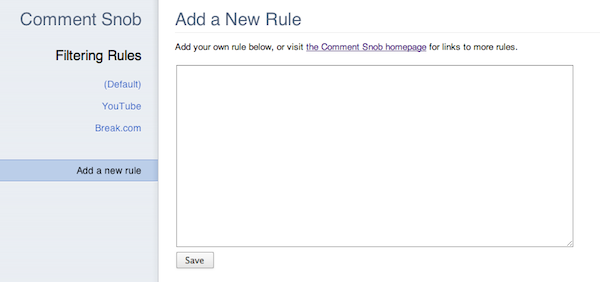
- Or, open the Comment Snob options and write your own Comment Snob rule.
Featured Comment Snob Rules
Writing a Comment Snob Rule
Are you familiar with HTML and jQuery? Then you can write Comment Snob rules for any website you want.
Components of a Rule
A Comment Snob rule is a JSON object that tells Comment Snob how to find comments on a website and where to place the “Show/Hide” toggle for each comment. These are the properties that each rule should (or can) have; all selectors should be written for consumption by jQuery:
| Attribute | Required | Description |
|---|---|---|
| id | Yes | A string that should be unique to your rule. This is used to make sure that the same rule is not installed multiple times. |
| label | Yes | A string that describes your rule to a user. It will usually be the name of the website that it filters. |
| url | Yes | A regular expression (encoded in a string) that describes the URLs for which your rule should be run. |
| allCommentsSelector | Yes | A selector that selects the smallest possible container that contains all of the comments for the page. |
| commentContainerSelector | Yes | A selector that selects the largest possible container that contains only a single comment, using allCommentsSelector as a starting point. |
| commentTextSelector | Optional | A selector that selects the smallest possible container that contains all of the text for a comment, using commentContainerSelector. If not specified, defaults to commentContainerSelector. |
| commentHideSelector | Optional | A selector that selects any nodes that should be hidden when a comment is filtered, using commentContainerSelector as a starting point. If not specified, commentTextSelector will be used. |
| statusElementTag | Optional | The HTML tag name that should be used to hold the “Show/Hide” toggle and the reason for filtering. If not specified, defaults to “span”. |
| statusContainerSelector | Optional | A selector that selects the element that will be used as a point of reference for where the “show/hide” toggle and filtering reason is placed for each comment. If not specified, defaults to commentContainerSelector. |
| statusPlacement | Optional | One of “prepend”, “append”, “before”, or “after”; used along with statusContainerSelector to insert the filtering status into each filtered comment. Defaults to “prepend”. |
| statusElementAttributes | Optional | A hash containing name/value pairs for attributes that can be added to the placeholder element specified by statusElementTag. |
| ajaxInitiatorSelector | Optional | A selector that selects any UI elements that might be clicked to trigger loading more comments via AJAX, using allCommentsSelector as a starting point. |
| dynamic | Optional | A boolean value (defaults to false) that indicates whether the website’s comments are not included in the main pageload, but are immediately loaded after the page loads. Disqus is the most common example of this. |
| updateURL | Optional | A URL where the JSON for this rule can be retrieved (for automatic updates). |
| author | Optional | Your name, email address, or website. |
| description | Optional | A text description of your rule, only recommended if the label doesn’t fully describe the functionality. |
The simplest possible rule might look like this:
{
	"id": "test@example.com",
	"label": "Example.com",
	"url": "^http://example\\.com/",
	"allCommentsSelector": "#comments",
	"commentContainerSelector": ".comment"
}
Rule Discovery
To let users install your rule, just link to a file that ends in .snob and contains only the JSON, or make your link in this format:
data:text/snob+json;base64,[base64-encoded JSON here]
Questions?
E-mail me at cfinke@gmail.com.
Comment Snob seems to only work on some videos with the new YouTube layout. Or is there something I’m doing wrong?
Do you have an example of a video it doesn’t work on?
https://www.youtube.com/watch?v=Hx7IUFmrJXM for example. I will say that the number of videos that Comment Snob does work is greater than the ones that don’t (in my experience).
If you’re running Comment Snob 4, it will update the YouTube rule within a few days. If you don’t want to wait, you can go into the Comment Snob preferences, go to the YouTube rule, click “Edit this rule” and replace this line:
with this line:
and click save. Then, it should filter comments on all videos.
That worked perfectly, thank you! And I’d just like to say, this add-on is probably the best thing I’ve ever used in my browser.
Hi Chris,
thanks for your extension. However I cannot get it to work. I want to block a few trolls in the comments of vz.lt
Here’s the rule I use:
{
"id": "vz.lt",
"label": "vz.lt",
"url": "^http://vz\\.lt/.*$",
"allCommentsSelector": ".content",
"commentContainerSelector": ".comment"
}
And in the preferences (“Contains one of these keywords or phrases”), I add the IP of the troll. However, only the first or the first few comments are filtered and the rest remains visible. Do I need to correct the rule? Or anything else? Thanks a million!
You were doing everything right; there’s a bug in Comment Snob preventing it from working. I’ll upload a new version to Mozilla Add-ons today, but if you want the fix right away, you can install it here: http://www.chrisfinke.com/files/downloads/addons/comment-snob.xpi?version=5.0a1
Thanks! Will you update the Chrome version as well?
I’m hoping to get the Chrome version updated soon, but no promises there.
Thanks in advance!
Hi Chris,
any news on the Chrome update? The Firefox version works fine, however the Chrome version still filters out only the first instance of the comment. Thanks!
Comment Snob seems to assume all Japanese is in caps, (even tho they dont have caps/non caps..)
Hence it hides all Japanese comments. Any hope for a fix? Example; http://www.youtube.com/watch?v=y3f64OcT0U0
I JUST INSTALLED IN FIREFOX,AFTER THAT I CHECK MY COMMENTS IN YOUTUBE AND ARE HIDDEN BUT NOT DELETED,I WANT FULL DELETE,HOW CAN I DELETE THEM AND NOT DISPLAY AGAIN?
Hey, dude, you may not have noticed, but one of the default filters in Comment Snob automatically hides comments that are in all caps. Sooooo that’s probably why you are being ignored.
Or it could be because your question has nothing to do with Comment Snob.
Peace out.
HOW CAN I DELETE MY OWN COMMENTS OF YOUTUBE?
This is a great idea! Reading news sites without completely losing faith in humanity. Do you think there’s a way to make it work in Safari?
How many Asian languages on YouTube comments that use all capital letters?
Hi Chris,
Do you have a rule, or would it be possible to make one, that would simply apply my default settings to all websites, rather than specific domains?
Many thanks,
–Justin
No; the rules have to take into consideration the HTML of each website. If multiple sites used the same HTML (via the same WordPress theme, for example), you could make a single rule apply to both of them by writing the
urlattribute regex like this:I know this is a minor, and very specific thing, but…
It would be great if any comments loaded after clicking the “Show more” button (in the new YouTube design) were also filtered.
I’m not sure how this would be achieved, but maybe the extension’s code could be executed on each click of the “Show more” button(?)
Irrespective of the above, it’s an excellent Extension! Thanks.
It should work that way; if it’s not, it’s a bug, and I’ll get it fixed.
Hi Christopher,
I’ve just checked on another YouTube video, and, unfortunately, the behaviour I described is definitely happening.
I checked whether it was being caused by another extension, and I’m now 95% sure it isn’t.
Cheers.
Absolutely love Comment Snob. Makes YouTube so much more enjoyable. Thanks! Genius!
Hello,
I’ve been using Comment Snob for a long time to block comments on YouTube. Over the past few weeks, I’ve noticed it’s stopped working.
I’ve checked for extension conflicts by disabling all my extensions apart from Comment Snob. That didn’t fix it.
Is there a bug fix for this, or will it have to involve writing a new version of the extension?
Thanks.
– Richard
Versions:
Comment Snob 6
Chrome Version 26.0.1410.19 beta
Mac OS 10.7.4
Test videos: http://youtu.be/HYN6AiujIe0, http://youtu.be/ddgyg_5FF_0
Grabs: http://screencast.com/t/6o0OZZpHHge, http://screencast.com/t/4XqIOdNwC55
It’s working for me with Comment Snob 6 in Chrome 27.0.1425.0 dev on Mac 10.7.5. What options do you have set for the filtering on YouTube pages?
I was using the default filtering rules for YouTube in those test pages, and selected the “Hide all comments” option.
Today, I installed Comment Snob on a clean Chrome profile and it worked. Then I went back to my usual profile, unchecked “Hide all comments”, and set “Hide comments with at least this many spelling mistakes” to 1, left every exception the profanity filter checked, and the comments were hidden.
There were a few comments with spelling mistakes that weren’t hidden though. Apart from that it seems to be working.
It’s a bit bizzarre, but Comment Snob is working. Sorry for the trouble.
How on earth do things like f**cking and sh*t make it through? Any word that has an asterix in it should be disabled. Also, why would I want to know a bad comment was there? Please provide the ability to completely hide removed comments, I don’t need to know how many immature people there are on the web.
Cool. Was able to address the asterix issue with the following in the keyword filter: \w+\*+\w+
Also, sorry about my harsh tone before. You’ve done fantastic work with this plugin, and I’d love to see it become just that tiny bit better. You’re doing great work. Keep it up :)
Wow. Just wow. In my humble opinion, this is the greatest extension EVER! Sadly, the level of discourse in comments on the internet has descended well below the level of graffiti on a Men’s Room wall, so, thank you, thank you, thank you, for this marvelous extension!
For some reason Comment Snob is not working on Youtube. I’ve tried disabling and re-enabling it but it just won’t work.
I use it on Google Chrome by the way.
Thank you, Chris! Just tested it and it works fabulously on Youtube. A dream troll-free experience at last.
You deserve a thousand kudos just for this.
Any chance of seeing a rule set for Facebook? Would really make my day, and I’m sure several others! :D
Pretty pretty please with sugar on top!? =C]
Facebook is a tricky one because of how most of their comments are loaded dynamically, but for discussions that are loaded with the page, this would work:
{ "id": "facebook@chrisfinke.com", "label": "Facebook", "url": "^https?://(www\\.)?facebook\\.com/", "allCommentsSelector": ".UFIList", "commentContainerSelector": "li.UFIComment", "commentTextSelector": ".UFICommentContent span span", "commentHideSelector": "> div" }YES! Please set a rule for facebook. It is the one site I really, really would love to use this on.
Use CommentBlocker extension for Chrome to get rid of fb comments. I just found it :) HAPPY am I!! Here’s a link to explain it: http://lifehacker.com/5675785/comment-blocker-helps-de-troll-the-internet-for-chrome-users
Hi Chris,
I have a few questions about making rules. I have a rule that works fairly well on a website called Weasyl, but I’m having a few problems. I can hide the comments, no problem, but how would I go about finding a way to show them, like on youtube, where it shows you why it was blocked and a “click here to view comment” button. Also, how would I go about adding multiple “allcommentsselectors”? This is what I have so far:
}

	"id": "weasyl@aldude999.net",

	"label": "Weasyl.com",

	"url": "^https://www.weasyl\\.com/",

	"allCommentsSelector": "#detail-comments",

	"commentContainerSelector": ".formatted-content"

}
and it looks like this:
https://pbs.twimg.com/media/BLHxXI-CQAEW5vA.jpg:large
Thanks in advanced!
Okay, forget all of that! I have a new and more frustrating problem. Only the first comment on the page is getting blocked! I’ve tried it on Firefox AND Chrome, and all of them only block the first. I’m pretty sure my rule is right too.
Also, every time I leave the page and come back by clicking on another tab, another bad comment gets blocked. This only happens with rules I’ve made myself.
Can you post your most recent rule? Then I’ll install it and see if the problem happens for me too.
Here’s a test page:
https://www.weasyl.com/submission/122516
Okay, here’s another bug. I’m trying to install my snob rules from my website, but when I click yes, that I want to install the rule, it just sits there and doesn’t install. It works with the example above, but not on my site. Please fix this bug!
Thank you for this add-on, it’s almost exactly what I’ve been looking for. My one gripe is that you can’t completely hide the existence of filtered comments. This is a big thing for me, even being aware of the existence of the comment annoys me. If it wasn’t for this, I could browse Youtube comments blissfully unaware of the world of stupid.
Yeah I love ya program,BUT it has soem issues on SRW Iron. Iron is a chromium based program as you well know that is the base code for chrome. Still I am having issues with blocking words and phrases. Can you modify the program to accept Iron? Iron uses alot of stuff from chrome its just streamlined. That the only reason its working at all. I need it fixed for youtube. Thanks for your time,and hopefully your help.
http://www.youtube.com/watch?v=41zO0Y1nv3s&list=PL4jE50fDHON1xe641nHj3k3NZ5qYKKbfX
Comment snob is not working for me . I use SRWIron. Can you help me figure out why it will not work on youtube? I set it for words specifically. IS there a limit to how many keywords?
Comment snob seems to have died again, on firefox (my main and nearly only browser) youtube still displays comments.
Comment Snob 4 seems to have died again. I’m still seeing Youtube comments.
As mentioned above, Comment Snob not working.
I love this addon!
Is it possible to hide comments by user? YouTube has no shortage of trolls, and it would be amazing if we could just block by user – they’re fairly well known!
Just wanted to say i love this addon. Thanks very much for making this!
Love love love this extension! I want to use it to block specific commenters on Disqus… but I’m not savvy enough to write my own rule.
Could you please add a filter option to hide comments *without* punctuation? Ie. if there are too many long spans with no commas or periods. A lot of idiots out there create those write-only comments and they definitely deserve to be blocked.
Oh, a bug: it treats comments with no letters at all (like just a time link on youtube, i.e. “50:34”) as all-caps too. My guess is that if it doesn’t see any letters it can recognise, it concludes that 0% (0 out of 0) were lowercase and thus it’s all caps it’s looking at.
Snob blocked one of my own comments for “too many spelling errors”, apparently because I used “polygyny” and “polyandrist”.
I would like to use this as a method to completely hide profanity… is there a way that I can do this globally, not just in comment sections?
It sounds like a job for something else than comment snob. It should stick to what it’s designed to do and not grow unrelated functionality, IMHO.
Hi,
Love your plugin but I havn’t gotten the hang of how to write my own rules yet.
Would it be possible to write a rule that filters out a special users comments on a wordpress blog ?
All the best !
-B
It depends on the theme, but most themes add a user-specific class to each comment, so they should be targetable in a rule.
Is not working for me, it´s been a month, maybe more since this, is there any current dificulties on the add?
Is it, or would it, be possible to support more than one spelling dictionary at the same time, such as “en-US;es-ES”, so that your bilingual and polyglot users don’t have to choose which of their languages gets flagged for “spelling errors”? Thanks for your consideration, and thanks for a great extension!
This extension is simply not working. I have it configured to disable all YouTube comments, and they are disappearing.
Chrome version 29 (Linux)
Comment Snob extension version 7
Hey chris, is there a way that you make a rule that blocks links in the comments section? In other words make it so that comments that have http://, or bit.ly are blocked. I’m not quite understanding on how to make rules.
Has anyone written a rule to filter my Twitter feed?
I don’t know if this can be done, but is there a way that this program can filter out comments from a Facebook user that I’m not friends with (without blocking all together). This person tends to make comments after me of a mutual friend (trying to up one on me). I just don’t want to see her name and her commends. I’ve tried the “Hide” option within Facebook, but that only works with one commend, I’d have to hit the Hide option each time she comments on something.
You could use Comment Snob to do this. Add a Facebook rule that targets the comment *author* as the text (instead of the actual text), uncheck “Use the default filtering preferences”, and put the offender’s name into “Contains one of these keywords or phrases”.
I can’t get this addon to do anything in Chrome on Youtube. No matter the settings on Youtube, even “hide all comments” has no effect.
Something I’ve noticed with the Reddit rules is that the “All capital letters” rule seems to trigger on comments that are just a url.
Might somebody be kind enough to provide me with SoundCloud comment snob code? I am not familiar with programming too much, sadly.
It does not work on YouTube or Facebook.
This is just a useless turd on Google Chrome
afaik, it was never updated after Youtube integrated with G+ so it’s been broken. It isn’t really the fault of Chrome.
Fix the extension! It doesn’t work on any website!
Tell a lie. It works on Reddit. But it is a bit slow to kick in.
Hi Chris! .. there is this site that i and my friends love very much, but recently “troll” activities started to raise up. we wonder if -comment snob- can hide specific users comments..??
that site is most popular (after youtube) in my country. thousands of people going to be happy if there is a chance.. would u check it up please!?
here is the link…
http://alkislarlayasiyorum.com/
This is bullshit.
The comments with bad spelling and punctuation are not the ones we need to get rid off.
The comments that have to go, are the comments by youtubes “top users” that instantly get 100 votes up by their retarded fanboys, and thus stay RIGHT under the fucking video for all eternity…
The youtube comment page is now basically only usable for people that manipulate their posts, and THAT has to change. I REALLY don’t care what PressFartToContinue has to say about EVERY video i watch. This guy is one of the biggest assholes on youtube, needs to die in a fire and i can’t understand how it’s not possible to remove comments from people like that. Youtube is literally fueling a war. You know how “gangs” kill each other because they… i dont even know… think that different things are cool?
I can’t wait to hear news about youtubers getting killed because they are part of the “other bro army”.
Youtube and their top youtubers are doing their best to fuel the hate, and it’s not even possible to watch youtube without seeing the most spammed comments anymore…
Hey, calm down! Isn’t it possible to block users for yourself in YouTube? I don’t know by myself, and I’m not sure if will be notified, if I get the answer here. But if not, it would be a great idea, to implement a user block like function in here!
Great bllog here! Also your site loads up fast! What web host are you the use
of? Can I gett your associate link onn your host? I
want my web site loaded up as quickly as yours lol
hello, i dont understand how to make a rule. can someone write me a common rule, for hiding different words that i dont want to read in youtube comments?
so that i only have to insert the word into the rule. thanks
Is there any way to remove those “trackback” type of comments?
For example:
Lynn Fox shared this via Google+1 year ago
and
Lynn Fox via Google+1 year ago
spamspamspam
Me too. :)
Yeah, I want to filter out Google+ comments like Ian does too. Any way to do this? :\
Hi!
I love the idea of this program, however, I can’t get keywords working. The comments will stay there whether or not they include the word i put there.
I kinda downloaded this program for just that feature, ’cause some channels I have subscribed have their regular commenters who really annoy me. They rarely have any content in their messages, and often don’t even make any sense. And they take space from the actual rational opinions. But since they don’t make any spelling errors, they don’t fit any of the existing categories.
Actually, nothing else than block all comments work on youtube, which could have been done with the regular adblock. Firefox is up to date and CS is at version 5.0a1.
Hello Chris, seems the Reddit rule no longer works – do you have any suggested changes?
Thanks for the tool!
Is it possible to use this to filter out videos posted by a specific person (ideally I suppose being able to filter out videos from a list of people would be better, but for the videos I watch there is one particular person who posts a lot of spam videos that have names entirely unrelated to the video). Thank you.
It does not seem to work for me. Using Windows 7, Chrome 41
Hi Chris,
Have tried using it for the following site with this rule and no joy ? what am i doing wrong please
{
“id”: “johnny@thejournal.ie”,
“label”: “thejournal.ie”,
“url”: “^https?://www\\.thejournal\\.ie/”,
“allCommentsSelector”: “#Parent-comment-3777480 > li”,
“commentContainerSelector”: “.text”
}
Hey Chris,
Got it working a bit but it will not hide the comments etc
{
“id”: “johnny@thejournal.ie”,
“label”: “thejournal.ie”,
“url”: “^https?://www\\.thejournal\\.ie/”,
“allCommentsSelector”: “ul.commentList.border”,
“commentContainerSelector”: “div.text”,
“StatusElementTag”: “div”,
“statusElementAttributes”: {
“class”: “text”,
“style”: ” color : #996600;”,
“comment-snob-processed”: “true”
},
“statusPlacement”: “after”
}
if you get a chance to have a look :-)
thanks in advance
J
Brilliant – works just fine, for me.
Dear Mr. Finke ;
’88 Comments,’ eh (Glenn Gould reference, perchance)?
I just read with sadness that you’re no longer going to continue work on ‘C.S.’ due to the XUL switchover, I want to thank you for having built – and kept running – Comment Snob.
I first used this wonderful little add-on with F’fox, and as I’m now ‘ambi-browser,’ I was pleasantly surprised when I saw it also available for Chrome, and every now and then, I purposefully take a peak at what the comments left (on YouTube, et. al) look like with CS not running.
It’s like looking into a deep abyss, of uneducated, illiterate …’things,’ all trying to make their stink smellier, their noises, louder, ruder than any other.
I’d much rather read a short, quiet and funny, sarcastic and wise comment, like one from Ms Dorothy Parker, than any of these boors, which CS so simply made go away.
Sad.
Whatever you do with the rest of your life, Chris, I know you’ll do well, as long as you keep your sense of humour.
All good wishes, on the road before you, and a big ‘thanks’ for giving us ‘quit time.’
It’s an awesome paragraph designed for all the internet visitors; they
will obtain benefit from it I am sure.
Personality traits on the basis of numerology Numerology number 9 birthday Numerology personality number 25 Numerology for the date of birth Numerology personality number 9 meaning Numerology for date of birth 16 Numerology birth date formula May 22 birthday numerology
http://numerologynumberbirthday.life
Hi do you know that you can increase your conversion ratio couple of
times and earn additional cash every day. There is incredible landing pages
tool. It is very easy even for noobs, if you are interested simply search in gooogle: pandatsor’s tools