
Note: AutoAuth is now being developed by Steffan Schlein. If you would like to leave feedback, please create an issue on GitHub.
Due to the upcoming deprecation of XUL-based add-ons, I am stopping development and support for this add-on. E-mail me if you’d to take over development.
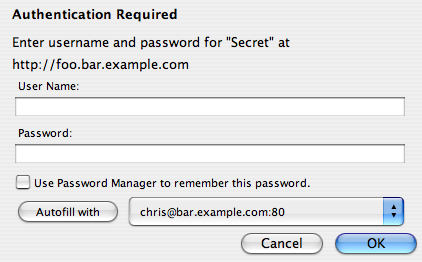
AutoAuth is an extension for Mozilla-based Web browsers that automatically submits HTTP authentication dialogs when you’ve chosen to have the browser save your login information. (If you’ve already told the browser what your username and password are, and you’ve told it to remember that username and password, why not just have it automatically submit it instead of asking you each time?)
Install AutoAuth from Mozilla Add-ons
If you’re having trouble with the extension or would like to see a new feature added, e-mail me at cfinke@gmail.com or leave a comment below.
Hi! :)
I couldn’t make it work, see discussion here: https://addons.mozilla.org/en-US/firefox/addon/4949
Thanks. :)
When going to a page that requires authentication and your password is bad, AuthAuth continually tries to authenticate to that page. It should just popup the authentication dialog so that the user can fix the password and resubmit. As it is, I don’t see any way for a user to update their password.
PS: To stop the flashing, close the tab.
I posted this at the addons.mozilla.org site as well.
Also I’m using Firefox 2.0.0.4.
Nice concept.
I tried it for a site that is annoying me today and no joy. Apparently it doesn’t fill forms, only HTTP Auth requests? Not sure what that means exactly, but didn’t work for me.
Would be great if it did form filling and auto-submission too, as many times use for access control. Then it would be REALLY cool…
Can you add a feature to detect when it gets stuck in a bad password loop? Thanks
Yeah, password change it flashing. How can I change the saved password?
Options tab is grayed out and I cannot use this add-on at all, even after two installation attempts.
Why not at least offer a context menu item to enter the un/pw for any given site desired?
Please work in Mozilla Thunderbird.
Because the reason is because there is RSS feeding in a basic certification area.
I don’t understand how it’s work (perhaps it doesn’t work :)… Can you make a demo?
Hi, when i going to a page that using multiple accounts for authentication, i cant select between saved accounts :(
Would you be so kind to make the xpi installable in Thunderbird as well ?
This would fill in my proxy credentials whenever I receive a mail with www content.
Thanks a lot for this so nice extension.
Pierre.
Thank you, works fine and is very useful for me
This is a great extension and saved me 15-30 minutes a day entering in authentication information where I work. We do a lot of web work on many different environments and domains and it is so wonderful not having to re-type account information over and over again for new projects.
You rock!
Can you change it to be compatible with 3.0b5pre. I use nightlies and its a pain to keep editing the xpi everytime there is a version bump.
Thanks,
Hi !
Excellent extension !!!!! One problem though, the “Autofill with” stopped working all together, it does not even give me the button or suggestions. I’m now only using this extension for auto-OK when I have a saved password, but I really miss the suggestions !
Thanks,
–C.
1.2.3 does not work with 3.0.1 Help
Please give me wildcards.
PLEEEEAAAASSSEEEE
This fantastic thing does not work with 3.0.2 FireFox…. Help please…
p.s. Sorry for my English…
I’ve made a slight modification to the extension. I removed the autofill feature, and perfected the selection of the account for usage. Also restricted the extension to Firefox 3.0 only.
You can get it here:
http://agachi.name/misc/autoauth-1.2.5.xpi
GREAT !! GREAT !!
Just what i was looking for since ages.
One question:
Can you please add a plug-in preference in order to
attempt to give a stored set of credentials when
these are empty or “remember flag” not set ?
When the proxy return a CACHE_ACCESS_DENIED sometimes
for a known squid-proxy error, the authentication form
appear blanked out, but my stored credential was perfectly
valid and a manual entry is needed.
If you store a user/pwd pair on plugin preference it could
work this way:
1- If auth data are already cached in the form, sumbit those
2- If auth data failed to authenticate, or form data empty, try alternate auth stored into preferences
3- if both fails, then do not loop-retry but just show the regular auth form
This way, it will be perfect!
I don’t get it. How does it work?
Hi Chris,
It seems that for the newest AutoAuth version 1.3 something was changed causing AutoAuth to not submit the authentication dialog box on page load. I reverted back to version 1.2.3 and everything works as desired. I know that there is still the existing looping issue for incorrect username and passwords, but I am not sure if your fix for the looping issue has caused AutoAuth to not submit the authentication dialog box automatically by design or by accident.
Please weigh in on this issue if you have a moment, and thank you for your efforts on such a convenient plugin for firefox.
Thank you!
Hi,
Just to confirm what Gabe said. On startup with many tabs, AutoAuth 1.3 stops after first dialog connection box.
I revert to 1.2.3 and it works again (great).
Can you add a way to disable the check introduced in 1.3 or limit its effect.
Thank you for this great plugin.
Chris
I want to use AutoAuth to automatically submit proxy authentication dialog boxes when Firefox starts. Firefox presents a proxy authentication dialog box for every tab in the session being restored, which can be 50+.
As Gabe and Gilles says, version 1.3 does not seem to work properly when Firefox is starting: i.e. I still get approximately 50 dialog boxes to click OK on.
Fortunately, version 1.2.3 works perfectly.
Please can you try make AutoAuth work correctly on Firefox startup again, as I would like to take advantage of the fix to incorrect authentication details as well.
Thanks for such a useful extension.
Roger
I was looking for an extension like this for a long time! It fix a very annoying Firefox behavior that some people here at my work uses as an excuse for not using Firefox.
Thank you very much!
(sorry for my bad english :) )
Fábio Alves Corrêa
Hi! That’s a nice fix for the bad firefox design. Unfortunately it doesn’t work for me, because there are some Websites at which I have to work with different accounts. So sometimes I need the normally annoying dialog box.
Could you:
1) make a configurable exception list for your plugin, so that I can add these web sites to it and you plugin will just do nothing for these web sites or pops up an account selection dialog? (sometimes I have only one account stored but need to enter a different account name without saving it in the password store).
I think there were some other users requesting a similar feature, so I am not alone :)
Can some1 plz tell how to use this..The option tab is greyed…i have no clue…how to make it work..
as per the above things…
itd be good to be able to set up domains like *google.com and itll submit the user/pass for the whole domain like 29google.com and mail.google.com and google.com/mail etc similar to how foxyproxy makes white/black lists..
This doesn’t work at all for me. Behind the latest squid proxy. No interface on page load or on any other tab.
I hope ‘ALLWAY AUTH CANCEL’ option.
It works Same as ESC key.
Thank you, works fine and is very useful for me
does it work with firefox 3.5.2 i just addet it and tryed to use it on my facebook however but the settings is grey and i cant acces them so what can i do
I too have the problem when firefox loads described by Gabe, Gills and Roger
I’m having an issue with it not functioning in FF 3.5.2. Any suggestions?
Does it work with regular form logins or is it just for HTTP authentication?
Will this extension have the option to select “primary” auth for those sites I have multiple accounts?
Perhaps an “auto auth in N seconds” ?
Firefox/3.5.2
I also use Secure Login
Great app.
But why can’t set default User&Password for non-saved site?
In fact, I will always input same User&Password …
bug when using firefox 3.6: the password dialog sometimes appears and sometimes it doesnt’.
using firefox 3.5 it work correctly.
can you fix it ? thanks!
Please pursue the (strong, I think) possibility that the just-released update to AutoAuth might be tied to persistent crashing on exit for FireFox 3.6.
Mozilla/5.0 (Windows; U; Windows NT 5.1; en-US; rv:1.9.2) Gecko/20100115 Firefox/3.6 (.NET CLR 3.5.30729)
Starting this afternoon, FireFox is consistently crashing when you close FireFox. I submitted several automatic bug-reports to Mozilla (when FireFox helpfully offered to do that for me), and I tagged the most recent ones in my comments with the word “AutoAuth” in case that might help you (and them) to quickly locate exactly which crash-reports I am talking about.
Could we hope, one day an autoauth runing with Google Chrome ?
(sorry for my english)
Hi,
first (like many others) i’d like to say that the extension is great. But … ;)
It would be nice when AutoAuth would show a little notice when it “entered” a username and password.
Regards,
Robert
It would be nice, if one could create a blacklist to prevent the usage on sites that you want to choose If you really want to send your credentials.
Love the add-on – saves me lots of precious time.
Minor niggle – I can’t get in to preferences in the add-ons menu… any ideas?
Stop working with FF 4.0 b8. Version 2.0.
Previous version works well.
Max: Sorry about the bug in version 2.0; try this version: https://addons.mozilla.org/en-US/firefox/addon/4949/versions/?page=1#version-2.1
It’s ok now. Thanks.
Hello!
A new version (2.1) trying to authenticate to the network cyclically if authentication failed. old 1.3.1 after the failed authentication suggested password dialog.
It would be nice to be able to momentarily bypass autoauth (for example by holding ctrl, cmd or any configurable key) so we can enter different credentials.
Thanks!
It is not working any more with latest firefox nightly build. Was working few days ago…
I’ve been using this for quite a while, and now I was wondering wether it is possible to submit a password with a blank username. I am connecting to a lot of webservers that don’t require a username, but only a password.
Is this possible?
Thanks!!
Unfortunately it doesn’t work on my FF4, I would love to see it work
It worked great in FF4, but it isn’t marked as compatible with FF5. Maybe you just need to update the compatibility listing and do no extra coding?
For FireFox 5 Users:
https://rapidshare.com/files/2730409335/autoauth-2.1-fx_fn.xpi
I just updated the install file to make it able to install it when you use firefox 5
hehehe , @above , why not publish it on to mozilla’s specially designed addon page…
so atleast it can be thought to be trusted
Not working whit FF 5 i can be install but dosen’t work at least for me :(
I’ve fixed the AutoAuth 2.1 addon to work with ANY Thunderbird and Firefox likely till the end of time (99.*):
http://files.sacharewicz.pl/mozilla/autoauth-2.1-fx+fn+tb.xpi
If you’d like to know how to do it yourself (how to fix/change addon version compability), or just don’t trust the file I’ve posted (by default, you shouldn’t :P), follow this steps:
1. Download my file AND download the official file: https://addons.mozilla.org/pl/firefox/addon/autoauth/
2. Unpack both files (it’s a standard zip archive, you can change the extension if you like, but remember to change it back afterwards)
3. Compare the content of the install.rdf file in both archives and you’ll know it’s done :D
Other files are identical.
Hi there! Excellent work, I love the plugimn. There is just one issue: When I use your plugin with a page that auto-refreshes via javascript, your plugin doesn’t work. Could you please look into that? CHeers! Stefan
@MichaÅ‚ Sacharewicz This fix didn’t work for me. Auto auth is not working with FF 3.2.68 and I plan to upgrade but many say it’s definitely broken with FF5. I’m also using ESR FF (for organizations). It seems to be the only thing of it’s kind anywhere. Hope to get a fix.
@Donna:
1. First of all, current compatibility of this addon has been updated by Mozilla and is now stated to be 3.6 – 12.0a1. It should work Out-of-the-Box with FF5, it’s been definitely working all the way from 5 to 11 for me. Check the addon website, the compatibility complaints in comments ceased at mid-2011:
https://addons.mozilla.org/en-US/firefox/addon/autoauth/
2. The fix I gave you should be working perfectly, but in that time I’ve found even better – and universal – solution:
https://addons.mozilla.org/en-US/firefox/addon/add-on-compatibility-reporter/
This Mozilla-made (official) addon disables the compatibility check in both Firefox and Thunderbird (ie. forces both programs to accept and run all addons, regardless of compatibility declarations) and enables user to send feedback to Mozilla about addons compatibility issues. It works perfectly for me and I had no single compatibility issue since July 2011.
3. The final and best news is that Mozilla realized that old compatibility checks cannot possibly work with current, rapid release cycle. As of FF10, the compatibility mechanism has been reworked and should automatically accept older-but-working addons:
https://wiki.mozilla.org/Features/Add-ons/Add-ons_Default_to_Compatible
@MichaÅ‚ Sacharewicz. Thanks for the response, I’ve upgraded to FF11 ( which prompted that I was actually downgrading when I installed it, even though the last version was 3.6.12) and added the compatibility reporter. It still doesn’t work. What am I supposed to see? I have passwords saved by the browser and confirmed this in the settings. I’ve restarted after every addon. I disabled all other plugins. I navigate to http and https login pages, the browser auto inserts my info and ..nothing, the form is not submitted. Btw I can’t tell by lack of consecutive complaints that the plugin is even still enabled for many. I’m on MAC if that helps but I don’t believe there’s a block plus I’m not getting a system message.
@ Donna: Can you post a screen of your Addon Manager window?
Hi,
Thanks for helping us escaping boring clicking ceremony every morning.
A proxy password, I used to enter thru AutoAuth, has an available duration. When expiring password duration, AutoAuth automatically send wrong password for authenticator. This cause account locks, (and unhappy process to resume account).
Can we set a password duration or a date to stop AutoAuth?
Hi Christopher,
Thanks so much for this great extension. It’s exactly what I need. I’ve been successfully using it for months. I’ve noticed that if you tell it you do NOT want it to memorize a particular website then there is not way to tell it you DO want it to memorize passwords for that same website at a LATER date. I guess I could delete and then re-install the add-on to “clear” the preferences but it would be nice to always have an option to memorize passwords for sites that you have previously told httpauth to not memorize passwords for.
Thanks again.
Quick question. I installed AutoAuth on my work computer and it was working perfectly – until I had to change my Windows password per corporate policy. Now when I attempt to navigate to our intranet home page, I have to authenticate again. AutoAuth seems to be remembering my OLD password – and even after multiple attempts to enter the new one, it doesn’t seem to get updated the next time I launch FF and navigate to our intranet home page. Can you help? Thanks!
AutoAuth is brilliant, can’t fault it. I’ve used in several kiosk/digital signage applications without a problem at all. The only times AutoAuth hasn’t worked was when the code of the site specified ‘autocomplete=”off”‘ and who can argue with that! Thank you for a great plugin.
Nice Addon, thank you.
Might it be possible to run the process in the background? Actually Firefox switches every time to the tab where the password is asked and makes this the active although I’m working in another tab.
Thank you and cheers,
mark
I’m required to change my NTLM password each month, so a means to change the remembered password is essential.
A more simple problem exists too however. Many of our servers will authenticate us against any one of several authorities. This means that we are offered more than one authentication dialogue, some of which need to be canceled, and others need to be filled in. I can identify which is which by the requesting authority in the dialogue, but the addon will only automatically dismiss dialogues which it has a stored ID and password for.
So, while some UI to change the stored details is needed, an optional detail should be to refuse an authentication dialog.
Thanks, very useful extension. Can you make it multi-process compatible? Thanks!
While I understand your decision, it’s a pity if development this AddOn is discontinued. Anyway: Thanks for all the fish!
Great extension, thanks to Steffan to continue it.
Does the new developer read this blog ?
If not can you tell him to update the bloc “More information” of the firefox addon page, to put a new site, an email or anything else to share feedback / bugs / suggestions.
Here some :
– The last review ask to have one password by “host:port.” For my utilisation, it’s far better to have one password by “host”. Perhaps an option can be add when typing the identification to include or not the port.
– I used almost always the same identification for all my host:port (dozens of them). Can you add a default password configuration used to prefill the login fields ? And/Or add a listbox to reuse another id for another site.
– Can you add a mass password update option (filter by host, login or old password).
– Can you manage the case when the password is incorrect (seems to have an infinite loading page)
Thank you !
ok no need for default configuration, we can save a default configuration with the classic password tool.
Comment with the today version 3.0.1 :
– Button Cancel/ignore doesn’t work if the login/password are filled.
And I keep these previous ideas :
– Can we choose to use the same login of a host no matter the port ?
– And still it would be great to have a mass update password option
Hi Thomas,
please open one or more issues on GitHub:
https://github.com/steffanschlein/AutoAuth/issues
Best regards,
Steffan
Congratulations.
This add-on works very nice to me.
I use a enterprise network and have the problem of authentication for years.
I had installed lots of add-ons to solve this problem, but only AutoAuth works in my browser.
Thanks too much. Great job!